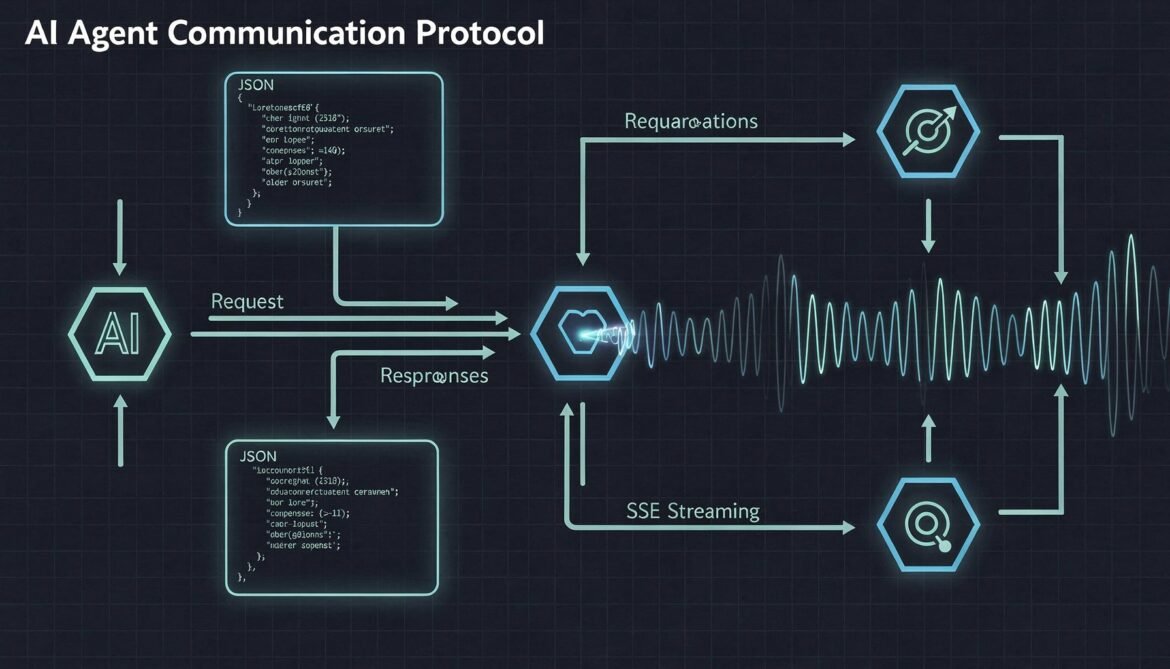
In Part 1, we covered what the A2A protocol is and why the enterprise ecosystem is rallying around it. Now it is time to go under the hood. To build anything real with A2A, you need a solid understanding of its core building blocks: how agents advertise themselves, how messages are structured, how tasks move through their lifecycle, and how streaming works for long-running operations.
This part is specification-level detail, but kept practical. Every concept here maps directly to code you will write in Parts 3 and 4.
The Four Core Building Blocks
The A2A protocol is built around four primary concepts that work together to enable agent-to-agent communication:
flowchart LR
    AC[Agent Card\nCapability Declaration] --> CA[Client Agent\nTask Initiator]
    CA -->|JSON-RPC over HTTP| RA[Remote Agent\nA2A Server]
    RA -->|SSE Stream / Response| CA
    RA --> TL[Task Lifecycle\nsubmitted → working → completed]
- Agent Card – the discovery and capability document
- Client Agent – the agent that delegates work
- Remote Agent (A2A Server) – the agent that executes work
- Task Lifecycle – the state machine governing every operation
Let us dig into each one in depth.
Agent Cards: The Discovery Layer
Before any agent can send a task to another agent, it needs to know three things: what the remote agent can do, how to reach it, and how to authenticate. All of this lives in the Agent Card.
An Agent Card is a JSON document served at a well-known URL on the remote agent’s server:
GET https://your-agent.example.com/.well-known/agent.jsonHere is a realistic Agent Card for an inventory management agent:
{
  "name": "Inventory Management Agent",
  "description": "Manages stock levels, processes inventory queries, and triggers reorder workflows",
  "version": "1.2.0",
  "url": "https://inventory-agent.example.com/a2a",
  "documentationUrl": "https://inventory-agent.example.com/docs",
  "provider": {
    "organization": "Acme Corp",
    "url": "https://acmecorp.example.com"
  },
  "capabilities": {
    "streaming": true,
    "pushNotifications": true,
    "stateTransitionHistory": true
  },
  "defaultInputModes": ["text", "application/json"],
  "defaultOutputModes": ["text", "application/json"],
  "skills": [
    {
      "id": "check-stock",
      "name": "Check Stock Level",
      "description": "Returns current stock quantity for one or more product SKUs",
      "tags": ["inventory", "stock", "query"],
      "examples": [
        "What is the current stock for SKU-12345?",
        "Check inventory levels for products in category electronics"
      ],
      "inputModes": ["text", "application/json"],
      "outputModes": ["application/json"]
    },
    {
      "id": "trigger-reorder",
      "name": "Trigger Reorder",
      "description": "Initiates a reorder workflow when stock falls below threshold",
      "tags": ["inventory", "reorder", "procurement"],
      "inputModes": ["application/json"],
      "outputModes": ["application/json"]
    }
  ],
  "securitySchemes": {
    "bearer": {
      "type": "http",
      "scheme": "bearer",
      "bearerFormat": "JWT"
    }
  },
  "security": [{ "bearer": [] }]
}
A few things worth noting here. The capabilities block tells the client agent whether this server supports streaming via SSE, push notifications for asynchronous updates, and state transition history for audit purposes. The skills array is how the client agent knows which specific tasks to route here. The securitySchemes follows OpenAPI conventions so any enterprise identity system can integrate cleanly.
Agent Cards can also be signed in A2A v0.3+, which lets client agents cryptographically verify the card has not been tampered with. This is critical for enterprise environments where you cannot trust every network hop.
The Message Structure
A2A uses JSON-RPC 2.0 as its message format. If you have worked with any JSON-RPC API before, this will look familiar. Every request has a method, a params block, and an id for correlation.
There are four primary methods in the A2A spec:
| Method | Purpose |
|---|---|
tasks/send | Submit a new task, wait for completion (synchronous) |
tasks/sendSubscribe | Submit a task and subscribe to SSE updates (streaming) |
tasks/get | Poll for the current state of an existing task |
tasks/cancel | Cancel an in-progress task |
Here is what a tasks/send request looks like when the client agent asks the inventory agent to check stock:
{
  "jsonrpc": "2.0",
  "method": "tasks/send",
  "id": "req-001",
  "params": {
    "id": "task-7f3a9b2c-1234-4abc-8def-0fedcba98765",
    "message": {
      "role": "user",
      "parts": [
        {
          "type": "text",
          "text": "Check current stock levels for SKU-12345 and SKU-67890"
        }
      ]
    },
    "metadata": {
      "correlationId": "order-workflow-42",
      "requestedBy": "procurement-agent-v2"
    }
  }
}
The id inside params is the Task ID. This is a UUID the client generates and owns. It is used to track this specific unit of work through its entire lifecycle, including polling, streaming updates, and eventual completion or failure.
The message structure mirrors what you know from LLM chat APIs: a role (user, agent) and parts. Parts can be text, file references, or structured JSON data. This flexibility is what makes A2A modality agnostic.
Task Lifecycle: The State Machine
Every task in A2A moves through a defined set of states. Understanding this state machine is essential before you write a single line of implementation code.
stateDiagram-v2
    [*] --> submitted: tasks/send or tasks/sendSubscribe
    submitted --> working: Remote agent starts processing
    working --> input_required: Agent needs more information
    input_required --> working: Client provides additional input
    working --> completed: Task finishes successfully
    working --> failed: Unrecoverable error
    working --> canceled: tasks/cancel received
    submitted --> canceled: tasks/cancel received
    completed --> [*]
    failed --> [*]
    canceled --> [*]
The input_required state is especially important for enterprise workflows. It is how A2A handles human-in-the-loop scenarios. If the remote agent needs approval from a human before proceeding, or needs clarifying information it cannot resolve on its own, it transitions to input_required and waits. The client agent then delivers the additional input and the task resumes.
Here is what the response object looks like when a task completes:
{
  "jsonrpc": "2.0",
  "id": "req-001",
  "result": {
    "id": "task-7f3a9b2c-1234-4abc-8def-0fedcba98765",
    "status": {
      "state": "completed",
      "timestamp": "2026-03-07T08:45:22Z"
    },
    "artifacts": [
      {
        "name": "stock-levels",
        "description": "Current inventory levels for requested SKUs",
        "parts": [
          {
            "type": "application/json",
            "data": {
              "SKU-12345": { "quantity": 240, "location": "Warehouse-A", "reorderThreshold": 50 },
              "SKU-67890": { "quantity": 12, "location": "Warehouse-B", "reorderThreshold": 30, "belowThreshold": true }
            }
          }
        ]
      }
    ],
    "metadata": {
      "correlationId": "order-workflow-42",
      "processingTimeMs": 340
    }
  }
}
The artifacts array is how the remote agent returns its results. An artifact has a name, description, and parts. Parts follow the same structure as message parts, so results can be text, structured JSON, file references, or any combination.
Streaming with Server-Sent Events
For long-running tasks, waiting for a single HTTP response is not practical. A2A uses Server-Sent Events (SSE) for streaming, which gives the remote agent a channel to push state updates and partial results back to the client as they become available.
You trigger streaming by using tasks/sendSubscribe instead of tasks/send. The server then keeps the HTTP connection open and sends events in this format:
data: {"type":"taskStatusUpdate","taskId":"task-7f3a9b2c-...","status":{"state":"submitted","timestamp":"2026-03-07T08:45:00Z"}}

data: {"type":"taskStatusUpdate","taskId":"task-7f3a9b2c-...","status":{"state":"working","timestamp":"2026-03-07T08:45:01Z","message":{"role":"agent","parts":[{"type":"text","text":"Querying warehouse database..."}]}}}

data: {"type":"taskStatusUpdate","taskId":"task-7f3a9b2c-...","status":{"state":"working","timestamp":"2026-03-07T08:45:02Z","message":{"role":"agent","parts":[{"type":"text","text":"Processing SKU-67890 threshold analysis..."}]}}}

data: {"type":"taskArtifactUpdate","taskId":"task-7f3a9b2c-...","artifact":{"name":"stock-levels","index":0,"lastChunk":true,"parts":[{"type":"application/json","data":{...}}]}}

data: {"type":"taskStatusUpdate","taskId":"task-7f3a9b2c-...","status":{"state":"completed","timestamp":"2026-03-07T08:45:22Z"}}
Each SSE event has a type field. taskStatusUpdate carries state transitions and intermediate progress messages. taskArtifactUpdate carries partial or complete result artifacts. The lastChunk flag on artifact updates signals that the artifact is fully delivered.
Here is the full streaming sequence visualized:
sequenceDiagram
    participant CA as Client Agent
    participant RA as Remote Agent (A2A Server)

    CA->>RA: POST /a2a (tasks/sendSubscribe)
    Note over RA: HTTP connection stays open

    RA-->>CA: SSE: taskStatusUpdate (submitted)
    RA-->>CA: SSE: taskStatusUpdate (working, "Querying database...")
    RA-->>CA: SSE: taskStatusUpdate (working, "Analyzing thresholds...")
    RA-->>CA: SSE: taskArtifactUpdate (partial result, lastChunk=false)
    RA-->>CA: SSE: taskArtifactUpdate (final result, lastChunk=true)
    RA-->>CA: SSE: taskStatusUpdate (completed)

    Note over CA,RA: HTTP connection closes
Push Notifications for Disconnected Clients
SSE works well when the client can maintain a persistent connection. But in enterprise environments, clients are often behind firewalls, run as serverless functions, or simply cannot hold a connection open for hours-long tasks.
A2A solves this with push notifications. If the Agent Card declares "pushNotifications": true, the client can register a webhook URL when submitting the task:
{
  "jsonrpc": "2.0",
  "method": "tasks/sendSubscribe",
  "id": "req-002",
  "params": {
    "id": "task-abc123",
    "message": { "role": "user", "parts": [{ "type": "text", "text": "Run quarterly compliance report" }] },
    "pushNotification": {
      "url": "https://my-orchestrator.example.com/webhooks/a2a-callback",
      "token": "eyJhbGciOiJIUzI1NiIsInR5cCI6IkpXVCJ9...",
      "authentication": {
        "schemes": ["bearer"]
      }
    }
  }
}
The remote agent posts status updates and artifacts to that URL as the task progresses. The client disconnects immediately after submitting and picks up results when its webhook fires. This pattern is essential for tasks that take minutes, hours, or even days.
Multi-Turn Conversations and input_required
The input_required state enables something powerful: multi-turn interactions within a single task. Rather than completing or failing, the remote agent can pause and ask for more information.
When a task enters input_required, the status update includes a message from the agent explaining what it needs:
{
  "type": "taskStatusUpdate",
  "taskId": "task-abc123",
  "status": {
    "state": "input_required",
    "timestamp": "2026-03-07T09:10:00Z",
    "message": {
      "role": "agent",
      "parts": [
        {
          "type": "text",
          "text": "SKU-67890 is below reorder threshold. Reorder quantity options: 100 units ($4,200), 250 units ($9,800), 500 units ($18,000). Please confirm quantity to proceed."
        }
      ]
    }
  }
}
The client agent responds by sending a new message on the same task ID:
{
  "jsonrpc": "2.0",
  "method": "tasks/send",
  "id": "req-003",
  "params": {
    "id": "task-abc123",
    "message": {
      "role": "user",
      "parts": [{ "type": "text", "text": "Proceed with 250 units." }]
    }
  }
}
The task resumes from working state. The entire conversation history for that task is preserved, which is what the stateTransitionHistory capability flag in the Agent Card advertises.
Error Handling
A2A errors follow JSON-RPC 2.0 conventions. Every error has a numeric code, a message, and an optional data block for additional context. The spec defines a set of standard error codes:
| Code | Meaning |
|---|---|
| -32700 | Parse error (malformed JSON) |
| -32600 | Invalid request |
| -32601 | Method not found |
| -32602 | Invalid params |
| -32603 | Internal error |
| -32001 | Task not found |
| -32002 | Task not cancelable (already in terminal state) |
| -32003 | Push notification not supported |
| -32004 | Unsupported operation |
| -32005 | Incompatible content types |
A failed task response looks like this:
{
  "jsonrpc": "2.0",
  "id": "req-001",
  "error": {
    "code": -32603,
    "message": "Internal error",
    "data": {
      "taskId": "task-7f3a9b2c-...",
      "reason": "Warehouse database connection timeout after 30s",
      "retryable": true
    }
  }
}
The retryable field in the data block is a convention worth adopting in your own implementations. It lets the client agent decide whether to retry immediately, back off and retry, or escalate to a human operator.
The Complete Architecture Picture
Putting it all together, here is what a complete A2A interaction looks like from end to end in a multi-agent enterprise system:
flowchart TD
    OA[Orchestrator Agent] -->|1 - GET agent.json| AC1[Inventory Agent Card]
    OA -->|1 - GET agent.json| AC2[Procurement Agent Card]

    OA -->|2 - tasks/sendSubscribe| IA[Inventory Agent]
    IA -->|3 - SSE: working| OA
    IA -->|4 - SSE: input_required| OA
    OA -->|5 - tasks/send confirm qty| IA
    IA -->|6 - SSE: completed + artifact| OA

    OA -->|7 - tasks/sendSubscribe| PA[Procurement Agent]
    PA -->|8 - Webhook callback| OA
    PA -->|9 - Webhook completed + PO artifact| OA

    subgraph Discovery
        AC1
        AC2
    end

    subgraph Execution
        IA
        PA
    end
Transport Security
One thing the spec is explicit about: production A2A deployments must use HTTPS. There is no optional mode here. TLS 1.3 is recommended with strong cipher suites. The client agent must validate the server’s TLS certificate against trusted CAs during the handshake.
Authentication credentials are always passed at the HTTP layer using the schemes declared in the Agent Card’s securitySchemes block. The A2A message body itself never carries credentials. This separation of concerns is intentional and it aligns with how enterprise API gateways and service meshes already handle auth.
What to Remember Before Part 3
Before we start writing code in Part 3, here are the key concepts to have solid in your head:
- Agent Cards are served at
/.well-known/agent.jsonand describe capabilities, skills, endpoint, and authentication requirements - All messages use JSON-RPC 2.0 over HTTP POST
- Tasks have a unique client-generated UUID and move through a defined state machine
- Use
tasks/sendfor synchronous tasks,tasks/sendSubscribefor streaming - SSE events carry either
taskStatusUpdateortaskArtifactUpdatepayloads - Push notifications let disconnected clients receive results via webhook
- The
input_requiredstate enables human-in-the-loop and multi-turn interactions on a single task - Errors follow JSON-RPC 2.0 with A2A-specific codes starting at -32001
In Part 3, we implement a fully functional A2A agent server in Node.js. We will build the Agent Card endpoint, the task handler, SSE streaming, and a basic in-memory task store to track state. By the end of that post you will have a running A2A server you can test against.
References
- A2A Protocol – Official Specification (https://a2a-protocol.org/latest/specification/)
- GitHub – A2A Protocol Repository, Linux Foundation (https://github.com/a2aproject/A2A)
- Google Developers Blog – “Announcing the Agent2Agent Protocol (A2A)” (https://developers.googleblog.com/en/a2a-a-new-era-of-agent-interoperability/)
- IBM Think – “What Is Agent2Agent (A2A) Protocol?” (https://www.ibm.com/think/topics/agent2agent-protocol)
- Google Cloud Blog – “Agent2Agent protocol (A2A) is getting an upgrade” (https://cloud.google.com/blog/products/ai-machine-learning/agent2agent-protocol-is-getting-an-upgrade)