The AI landscape is evolving rapidly, and one of the most significant developments in late 2024 is Anthropic’s introduction of Agent Skills for Claude. Announced in October 2024 and expanded with major updates in December 2024, Agent Skills represent a fundamental shift in how we extend AI capabilities. This comprehensive guide will take you from the basics to production deployment across eight detailed parts.
What Are Claude Agent Skills?
Agent Skills are modular, filesystem-based resources that extend Claude’s capabilities through organized folders containing instructions, scripts, and resources. Unlike traditional prompts that require repetition across conversations, Skills are reusable packages of expertise that Claude loads dynamically when relevant to specific tasks.
Think of Agent Skills as comprehensive training manuals. Just as you would create an onboarding guide for a new team member, Agent Skills package domain-specific knowledge, workflows, and best practices into discoverable, loadable resources that transform general-purpose AI agents into specialized experts.
Why Agent Skills Matter in 2025
The release of Agent Skills addresses a critical limitation in AI systems. While large language models excel at many tasks, they traditionally lack a scalable way to incorporate procedural knowledge and organizational context. Before Agent Skills, developers faced three main challenges:
- Repeating the same instructions across multiple conversations, wasting tokens and context
- Hardcoding specialized knowledge directly into system prompts, leading to bloated, unmaintainable code
- Lacking a portable, standardized way to share expertise across different AI platforms
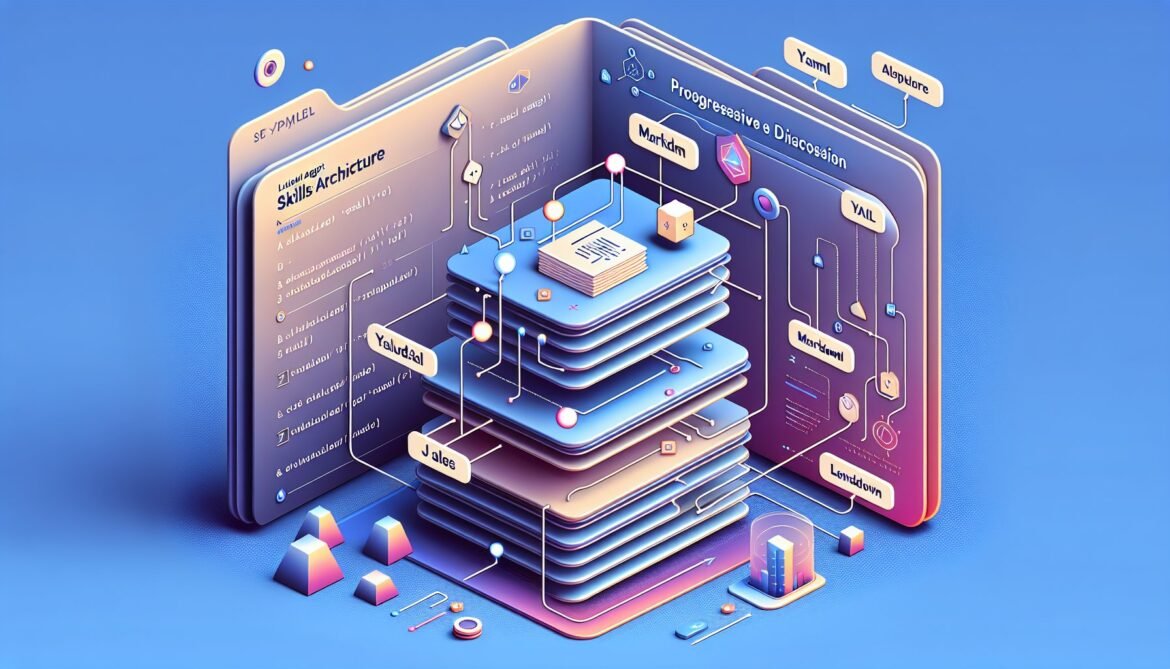
Agent Skills solve these problems through a simple yet powerful architecture built on progressive disclosure principles. According to Anthropic’s engineering team, Skills enable agents to load information only as needed, rather than consuming context upfront. This means the amount of context bundled into a skill is effectively unbounded.
Core Architecture: How Agent Skills Work
At its simplest, an Agent Skill is a directory containing a SKILL.md file. This file follows a specific structure with two essential components:
1. YAML Frontmatter (Metadata)
The frontmatter provides metadata that controls how Claude discovers and uses the skill. Here is a basic example:
---
name: pdf-processing
description: Extract text and tables from PDF files, fill forms, merge documents. Use when working with PDF documents or when the user mentions PDFs, forms, or document extraction.
version: "1.0"
license: Apache-2.0
---
The two required fields are name and description. The name must use lowercase letters, numbers, and hyphens only, with a maximum of 64 characters. The description field, limited to 1024 characters, serves dual purposes: it tells Claude what the skill does and when to use it.
2. Markdown Content (Instructions)
Following the frontmatter is the actual skill content written in Markdown. This section contains detailed instructions, examples, guidelines, and step-by-step procedures that Claude follows when the skill is activated. There are no format restrictions, giving you complete flexibility in how you structure your instructions.
The Progressive Disclosure Pattern
Progressive disclosure is the core design principle that makes Agent Skills flexible and scalable. Like a well-organized manual with a table of contents, specific chapters, and a detailed appendix, Skills let Claude load information in stages:
Stage 1: Discovery (Startup)
At startup, Claude pre-loads only the name and description from every installed skill’s YAML frontmatter into its system prompt. This metadata is extremely lightweight, consuming just a few dozen tokens per skill. This allows you to install dozens or even hundreds of skills without overwhelming the context window.
Stage 2: Activation (On Demand)
When a user’s request matches a skill’s description, Claude loads the full SKILL.md content from the filesystem. Only at this point do the detailed instructions become available in the context window.
Stage 3: Resource Loading (As Needed)
Skills can include additional directories for scripts, reference documents, and assets. These resources are not loaded into context until Claude specifically references them. This means you can bundle comprehensive API documentation, large datasets, or extensive examples without any context penalty until they are actually needed.
Standard Directory Structure
While only SKILL.md is required, the standard structure uses three additional directories, each serving a specific purpose:
my-skill/
├── SKILL.md           # Core prompt and instructions
├── scripts/           # Executable Python/Bash scripts
├── references/        # Documentation loaded into context
└── assets/            # Templates and binary files
This separation enables efficient context management. The scripts directory contains executable code that Claude can run without loading full contents into context. Only the script output consumes tokens. The references directory holds additional documentation that agents read on demand, keeping individual files focused and small. The assets directory stores templates, configuration files, or binary resources.
Where Agent Skills Are Available
One of the most powerful aspects of Agent Skills is their cross-platform availability. The Agent Skills specification was released as an open standard in December 2024, making skills portable across different tools and platforms. Currently, Agent Skills work in:
- Claude API: Both pre-built and custom skills via the /v1/skills endpoints
- Claude.ai: Web interface with skill management in settings
- Claude Code: Filesystem-based skills in .claude/skills/ directory
- Claude Agent SDK: Custom agent development with skill support
- GitHub Copilot: VS Code integration following the open standard
- Other AI platforms: Any tool adopting the Agent Skills standard
This cross-platform portability is revolutionary. Skills you create for Claude can work with OpenAI’s models, Google’s Gemini, or any other AI system that implements the standard. As noted by developer Simon Willison, you can grab a skills folder right now, point any compatible tool at it, and it will work despite those tools having no baked-in knowledge of the skills system.
Pre-Built Skills Available Today
Anthropic provides several pre-built Agent Skills for common document tasks, all available immediately through the Claude API and Claude.ai:
- PowerPoint (pptx): Create presentations, edit slides, analyze presentation content
- Excel (xlsx): Create spreadsheets, analyze data, generate reports with charts
- Word (docx): Create documents, edit content, format text
- PDF (pdf): Generate formatted PDF documents, extract text and tables, fill forms
These document creation capabilities that launched with Claude’s code interpreter feature in September 2024 turned out to be entirely implemented using Skills. The complete source code for these skills is now available in Anthropic’s GitHub repository, providing excellent reference implementations for building your own complex skills.
Enterprise Features and Management
The December 2024 updates brought significant enterprise-focused capabilities. Organizations on Team and Enterprise plans now have access to centralized skill management, allowing administrators to provision and control which skills are available to their users.
Additionally, Anthropic launched a skills directory featuring pre-built skills from partners including Atlassian, Canva, Cloudflare, Figma, Notion, Ramp, and Sentry. These partner skills demonstrate real-world applications, such as Atlassian’s skills that transform specs into Jira backlogs, generate status reports, and surface company knowledge from Confluence.
The Open Standard Initiative
In December 2024, Anthropic published Agent Skills as an open standard at agentskills.io. This move follows the success of their Model Context Protocol (MCP), which became the de facto standard for how AI agents use tools. By making Agent Skills an open specification, Anthropic is positioning it to become the industry standard for extending AI capabilities.
According to industry analysts at Gartner and Omdia, this standardization represents a crucial evolution in the AI market. The focus is shifting from model updates to practical use cases, with Agent Skills enabling more autonomous AI workflows and process re-engineering.
Security Considerations
With great power comes great responsibility. Agent Skills give Claude access to execute code, which means security must be a primary concern. Anthropic strongly recommends using Skills only from trusted sources: those you created yourself or obtained directly from Anthropic.
If you must use a skill from an untrusted or unknown source, exercise extreme caution and thoroughly audit it before use. Malicious skills could potentially lead to data exfiltration, unauthorized system access, or other security risks depending on what access Claude has when executing the skill.
What Makes Skills Different from Prompts
Some developers have questioned whether Skills are really a distinct feature or just structured prompts. While it is true that Skills are conceptually simple (organized folders with markdown instructions), several key differences make them transformative:
- Discoverability: Claude automatically knows about all installed skills through lightweight metadata
- Progressive loading: Full instructions only load when needed, enabling unbounded context
- Code execution: Skills can include deterministic scripts for efficiency and reliability
- Reusability: Once created, skills work across multiple conversations and platforms
- Standardization: The open specification ensures portability across different AI tools
- Organization-wide sharing: Skills can be deployed centrally for entire teams
As developer feedback suggests, we are likely to see a Cambrian explosion in Agent Skills that will make 2024’s MCP rush look pedestrian by comparison. The simplicity of the format, combined with its power and portability, creates ideal conditions for widespread adoption.
Coming Up in This Series
This introduction has covered the fundamentals of what Agent Skills are, why they matter, and how they work at a high level. In the remaining parts of this series, we will dive deep into practical implementation:
- Part 2: Creating Your First Custom Skill (hands-on tutorial with code examples)
- Part 3: Advanced Skill Development Patterns (progressive disclosure, resource bundling)
- Part 4: Integrating Skills with Claude API (Node.js, Python, and C# implementations)
- Part 5: Enterprise Deployment and Management (organization-wide provisioning)
- Part 6: Security Best Practices for Agent Skills (auditing, sandboxing, governance)
- Part 7: Building Skills for Specific Use Cases (real-world examples and templates)
- Part 8: Troubleshooting and Optimization (performance tuning, debugging strategies)
Each part will include working code examples across multiple programming languages, architectural diagrams, and production-ready patterns you can implement immediately.
Getting Started Resources
Before moving to Part 2, familiarize yourself with these official resources:
- Agent Skills Official Documentation: Platform documentation with API references
- Agent Skills Cookbook: Practical examples and tutorials
- Anthropic Skills GitHub Repository: Source code for pre-built and example skills
- Agent Skills Specification: The complete open standard definition
- Engineering Blog Post: Deep dive into the architecture and design decisions
The revolution in AI capabilities is not just about larger models or more parameters. It is about making AI systems more composable, scalable, and portable through standards like Agent Skills. As we continue this series, you will gain the knowledge to build production-ready skills that extend Claude’s capabilities for your specific organizational needs.
References
- Anthropic Engineering Blog – “Equipping agents for the real world with Agent Skills” (https://www.anthropic.com/engineering/equipping-agents-for-the-real-world-with-agent-skills)
- Anthropic News – “Introducing Agent Skills” (https://www.anthropic.com/news/skills)
- AI Business – “Anthropic Launches Skills Open Standard for Claude” (https://aibusiness.com/foundation-models/anthropic-launches-skills-open-standard-claude)
- GitHub – anthropics/skills – “Public repository for Agent Skills” (https://github.com/anthropics/skills)
- Agent Skills – “Specification” (https://agentskills.io/specification)
- Simon Willison’s Weblog – “Claude Skills are awesome, maybe a bigger deal than MCP” (https://simonwillison.net/2025/Oct/16/claude-skills/)
- Claude Developer Platform – “Agent Skills Overview” (https://platform.claude.com/docs/en/agents-and-tools/agent-skills/overview)
- The New Stack – “Agent Skills: Anthropic’s Next Bid to Define AI Standards” (https://thenewstack.io/agent-skills-anthropics-next-bid-to-define-ai-standards/)