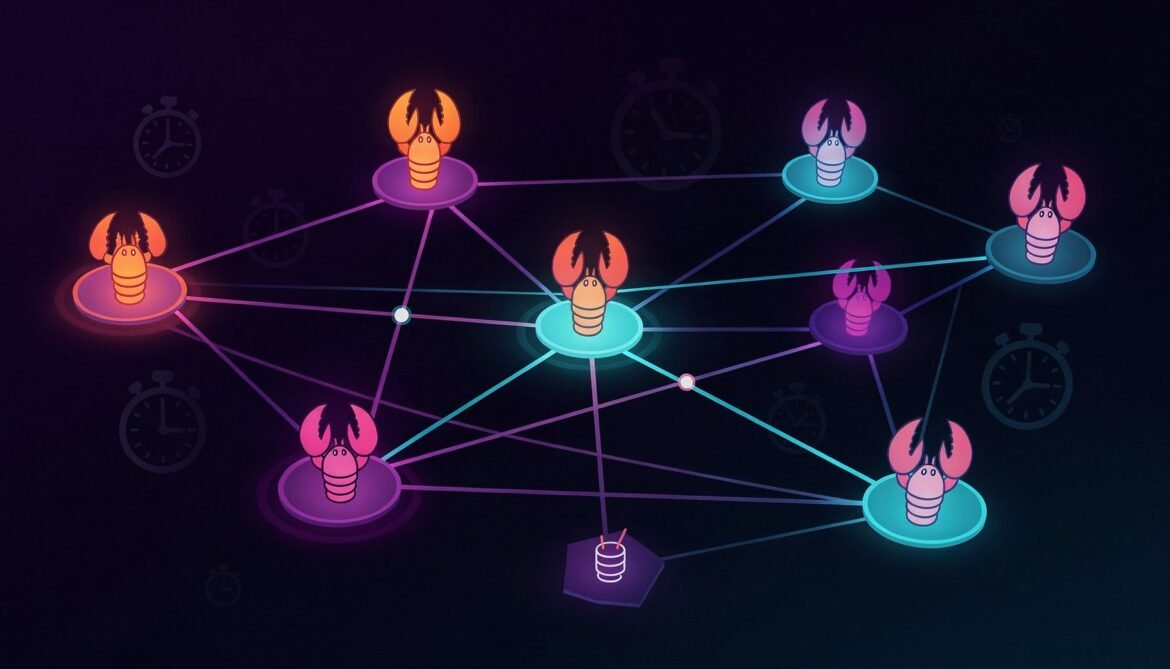
Up to this point we have been working with a single agent. One gateway, one LLM connection, one set of skills. That works well for personal productivity. But OpenClaw’s real power emerges when you run multiple specialized agents simultaneously, each focused on a specific domain, communicating with each other to complete complex workflows that no single agent could handle cleanly on its own.
This post covers multi-agent architecture in OpenClaw: how to create multiple workspaces, how agents communicate, how to schedule automation with cron jobs, and how to design orchestration patterns that are reliable in production. The examples use Node.js and Python throughout.
Why Multiple Agents
The case for multiple agents is the same as the case for microservices: a single agent loaded with 50 skills and responsible for everything becomes slow, unpredictable, and hard to debug. Specialized agents loaded with only the skills they need are faster, more reliable, and easier to maintain. Each agent loads only relevant context, which means the LLM spends less of its context window on irrelevant instructions and more on the task at hand.
flowchart TD
    subgraph Single["Single Agent (problematic at scale)"]
        SA["One agent\n50+ skills loaded\nAll tools enabled\nSlower responses\nHarder to debug"]
    end

    subgraph Multi["Multi-Agent (recommended)"]
        CA["Code Agent\ngithub, node-health\ncron-backup\nazure-status"]
        RA["Research Agent\nweb-search, arxiv\ndeep-research\nnews-monitor"]
        CA2["Comms Agent\ngog, slack\nmorning-briefing\nemail-draft"]
        OA["Orchestrator Agent\nRoutes tasks\nCoordinates results\nHandles scheduling"]

        OA -->|"Code tasks"| CA
        OA -->|"Research tasks"| RA
        OA -->|"Communication tasks"| CA2
        CA -->|"Results"| OA
        RA -->|"Results"| OA
        CA2 -->|"Results"| OA
    end
Creating Multiple Agent Workspaces
Each agent in OpenClaw has its own workspace directory. The workspace contains its own openclaw.json, SOUL.md, MEMORY.md, and skills/ folder. Multiple agents can run on the same machine by pointing the gateway to different workspace directories.
# Create separate workspace directories for each agent
mkdir -p ~/agents/code-agent
mkdir -p ~/agents/research-agent
mkdir -p ~/agents/comms-agent
mkdir -p ~/agents/orchestrator

# Initialize each workspace with the onboard wizard
# (run once per workspace, skip daemon setup each time)
openclaw onboard --workspace ~/agents/code-agent
openclaw onboard --workspace ~/agents/research-agent
openclaw onboard --workspace ~/agents/comms-agent
openclaw onboard --workspace ~/agents/orchestrator
Each workspace gets its own configuration. Here is an example for the code agent:
{
  "workspace": "/home/openclaw/agents/code-agent",
  "llm": {
    "provider": "anthropic",
    "model": "claude-sonnet-4-20250514",
    "apiKey": "${ANTHROPIC_API_KEY}"
  },
  "gateway": {
    "port": 18791,
    "bind": "loopback",
    "auth": { "enabled": true, "token": "${CODE_AGENT_TOKEN}" }
  },
  "channels": {
    "telegram": {
      "enabled": true,
      "token": "${CODE_AGENT_BOT_TOKEN}"
    }
  },
  "tools": {
    "exec": {
      "enabled": true,
      "allowedCommands": ["git", "npm", "node", "python3", "az", "gh"]
    },
    "file-read": { "enabled": true },
    "file-write": { "enabled": true },
    "web-fetch": { "enabled": false },
    "web-search": { "enabled": false },
    "cron": { "enabled": true },
    "memory": { "enabled": true }
  },
  "skills": {
    "entries": {
      "github": { "enabled": true, "env": { "GITHUB_TOKEN": "${GITHUB_TOKEN}" } },
      "node-health": { "enabled": true },
      "azure-status": { "enabled": true },
      "cron-backup": { "enabled": true }
    }
  }
}
Notice each agent uses a different gateway port (18791, 18792, 18793) and has its own Telegram bot. Users interact with the right agent by messaging the right bot. The orchestrator agent has access to all bots and can route messages between agents.
Running Multiple Gateway Instances
Each agent needs its own systemd service pointing to its workspace and port.
# Create a service for the code agent
cat > ~/.config/systemd/user/openclaw-code-agent.service << 'EOF'
[Unit]
Description=OpenClaw Code Agent
After=network-online.target
Wants=network-online.target

[Service]
Type=simple
WorkingDirectory=/home/openclaw/agents/code-agent
ExecStart=/home/openclaw/.nvm/versions/node/v22.14.0/bin/openclaw gateway start \
  --workspace /home/openclaw/agents/code-agent \
  --port 18791 \
  --foreground
Restart=always
RestartSec=10
EnvironmentFile=/home/openclaw/.openclaw/.env
Environment=PATH=/home/openclaw/.nvm/versions/node/v22.14.0/bin:/usr/local/bin:/usr/bin:/bin
Environment=HOME=/home/openclaw
MemoryMax=256M

[Install]
WantedBy=default.target
EOF

# Repeat for research-agent (port 18792) and comms-agent (port 18793)
# Then enable and start all services
systemctl --user daemon-reload
systemctl --user enable openclaw-code-agent
systemctl --user enable openclaw-research-agent
systemctl --user enable openclaw-comms-agent
systemctl --user start openclaw-code-agent
systemctl --user start openclaw-research-agent
systemctl --user start openclaw-comms-agent
Agent-to-Agent Communication
OpenClaw agents communicate with each other via the sessions API. When the sessions tool is enabled, an agent can spawn sub-tasks on another agent and receive results back. This is the foundation of the orchestrator pattern.
sequenceDiagram
    participant User
    participant Orch as Orchestrator Agent
    participant Code as Code Agent (port 18791)
    participant Research as Research Agent (port 18792)
    participant Comms as Comms Agent (port 18793)

    User->>Orch: "Weekly project report: check GitHub PRs, research competitors, draft summary email"
    Orch->>Code: sessions_spawn: "List open PRs and recent commits"
    Orch->>Research: sessions_spawn: "Research top 3 competitor updates this week"
    Code-->>Orch: PR list and commit summary
    Research-->>Orch: Competitor research results
    Orch->>Comms: sessions_spawn: "Draft weekly summary email with this data"
    Comms-->>Orch: Drafted email content
    Orch->>User: "Report complete. Email drafted. Confirm to send?"
The sessions skill in the orchestrator workspace teaches it how to communicate with other agents. Here is how the orchestrator SOUL.md configures this:
# Orchestrator Agent

You coordinate tasks across specialized agents. You do not execute tasks directly.
Your job is to decompose complex requests and delegate to the right agent.

## Available Agents

- Code Agent: port 18791 - handles GitHub, deployments, code quality, backups
- Research Agent: port 18792 - handles web research, news, technical articles
- Comms Agent: port 18793 - handles email drafting, Slack messages, calendar

## Delegation Protocol

1. Analyze the user request and identify which agents are needed
2. Spawn parallel sessions where tasks are independent
3. Spawn sequential sessions where one result feeds the next
4. Collect all results and synthesize a final response for the user
5. Always tell the user which agents you are delegating to

## Communication Format

When spawning a sub-task:
  sessions_send --to code-agent --port 18791 --message "your task here"

Wait for the result before proceeding to dependent tasks.
For independent tasks, spawn them simultaneously and wait for all results.
Cron Jobs: Proactive Automation
Cron jobs transform OpenClaw from a reactive assistant into a proactive one. Instead of waiting for you to ask, the agent checks things on a schedule and reports to you unprompted. This is configured in the cron/ directory of each workspace.
flowchart LR
    subgraph Schedule["Cron Schedule"]
        C1["Every morning 7AM\nDaily briefing"]
        C2["Every 30 min\nGitHub CI monitor"]
        C3["Every Friday 5PM\nWeekly summary"]
        C4["Every midnight\nBackup check"]
        C5["Every hour\nAzure deployment status"]
    end

    subgraph Actions["Agent Actions"]
        A1["Fetch calendar, news, weather\nSend Telegram summary"]
        A2["Check failed builds\nAlert on failures"]
        A3["Compile week's standups\nSend summary report"]
        A4["Verify backup ran\nAlert if missed"]
        A5["Check failed deployments\nAlert if any"]
    end

    C1 --> A1
    C2 --> A2
    C3 --> A3
    C4 --> A4
    C5 --> A5
Configuring Cron Jobs in OpenClaw
Cron jobs are defined as JSON files in the cron/ directory of your workspace. Each file defines a schedule and a task for the agent to perform.
mkdir -p ~/agents/code-agent/cron
// ~/agents/code-agent/cron/github-monitor.json
{
  "name": "github-ci-monitor",
  "schedule": "*/30 * * * *",
  "enabled": true,
  "task": "Check the status of the most recent GitHub Actions runs on all repositories I have access to. If any run has failed in the last 30 minutes that has not already been reported today, send me a Telegram message with the repository name, workflow name, and a link to the failed run. If all runs are passing, do nothing.",
  "channel": "telegram",
  "silentOnSuccess": true
}
// ~/agents/comms-agent/cron/morning-briefing.json
{
  "name": "morning-briefing",
  "schedule": "0 7 * * 1-5",
  "enabled": true,
  "task": "Prepare and send my morning briefing. Include: (1) Today's calendar events from Google Calendar, (2) Top 3 unread emails by priority, (3) Any open GitHub PRs awaiting my review, (4) Weather for Kathmandu today. Format as a clean Telegram message with clear sections.",
  "channel": "telegram",
  "silentOnSuccess": false
}
// ~/agents/code-agent/cron/weekly-backup-check.json
{
  "name": "weekly-backup-check",
  "schedule": "0 9 * * 1",
  "enabled": true,
  "task": "Check that the automated backups from last week ran successfully. Look in ~/backups/ for files created in the last 7 days. Report the count, total size, and date of most recent backup. If no backups exist from the last 7 days, send a high-priority alert.",
  "channel": "telegram",
  "silentOnSuccess": false
}
Building a Complete Automation Pipeline
Let us put together a complete real-world pipeline: an automated code review workflow that triggers when a PR is opened on GitHub, runs quality checks, and posts a review summary as a PR comment.
flowchart TD
    GH["GitHub PR opened"]
    WH["GitHub Webhook\nPOST to OpenClaw webhook endpoint"]
    CA["Code Agent\nReceives webhook event"]
    CK["Run checks:\n- node-health on changed files\n- npm audit\n- git diff summary"]
    RES["Compile review summary"]
    COM["Post PR comment\nvia gh CLI"]
    TG["Send Telegram notification\nto developer"]

    GH -->|"PR event"| WH
    WH -->|"Triggers"| CA
    CA --> CK
    CK --> RES
    RES --> COM
    RES --> TG
Step 1: Configure the Webhook Skill
---
name: github-pr-review
description: Automated code review when a GitHub PR webhook is received
version: 1.0.0
author: chandan
requires:
  tools:
    - exec
    - file-read
    - webhooks
  binaries:
    - node
    - npm
    - gh
  config:
    - GITHUB_TOKEN
tags:
  - github
  - automation
  - code-review
---

# GitHub PR Auto-Review Skill

This skill triggers when a GitHub pull_request webhook event is received.

## Webhook Trigger

Listen for POST requests to /webhook/github with a JSON body containing:
- event: "pull_request"
- action: "opened" or "synchronize"
- repository.full_name: the repo name
- pull_request.number: the PR number
- pull_request.head.sha: the commit SHA

## Review Workflow

When triggered:

1. Clone or fetch the repository if not already local:
   gh repo clone {repository.full_name} /tmp/pr-review/{pr_number}
   OR: cd /tmp/pr-review/{pr_number} && git fetch && git checkout {head_sha}

2. Get the diff:
   gh pr diff {pr_number} --repo {repository.full_name}

3. Run npm audit if package.json changed:
   cd /tmp/pr-review/{pr_number} && npm audit --audit-level=moderate

4. Run node health check:
   node ~/openclaw/skills/node-health/check.js /tmp/pr-review/{pr_number}

5. Compile findings into a review comment:
   - Summary of changes (files changed, lines added/removed)
   - npm audit result (pass/fail with vulnerability count)
   - Health check score (X/Y checks passed)
   - Any specific issues found

6. Post the comment to the PR:
   gh pr comment {pr_number} --repo {repository.full_name} --body "{review_comment}"

7. Send Telegram notification summarizing the review

## Comment Format

Use this format for the PR comment:

## Automated Review by OpenClaw

**Health Score**: X/Y checks passed
**Security**: npm audit {passed/failed - N vulnerabilities}

### Summary
{2-3 sentence summary of the changes}

### Issues Found
{list of issues, or "No issues detected"}

---
*Automated review - review manually before merging*

## Security Notes

Never post secrets, API keys, or sensitive config values in PR comments.
Only review repositories the user has explicitly authorized.
Step 2: Configure GitHub Webhook
# Enable webhooks tool in code agent openclaw.json
# (already covered in Part 6 config)
# The webhook endpoint will be: http://127.0.0.1:18790/webhook/github
# Exposed via Cloudflare tunnel as: https://openclaw.yourdomain.com/webhook/github

# In your GitHub repository settings:
# Settings > Webhooks > Add webhook
# Payload URL: https://openclaw.yourdomain.com/webhook/github
# Content type: application/json
# Secret: your-webhook-secret
# Events: Pull requests
Step 3: Webhook Receiver in Node.js
For more complex webhook processing, you can write a Node.js receiver that validates the GitHub signature before passing the event to OpenClaw:
// webhook-validator.js
// Middleware to validate GitHub webhook signatures before forwarding to OpenClaw

const crypto = require("crypto");
const http = require("http");

const GITHUB_WEBHOOK_SECRET = process.env.GITHUB_WEBHOOK_SECRET;
const OPENCLAW_WEBHOOK_PORT = 18790;
const LISTENER_PORT = 9000;

function validateGitHubSignature(payload, signature) {
  if (!GITHUB_WEBHOOK_SECRET || !signature) return false;
  const expected = "sha256=" + crypto
    .createHmac("sha256", GITHUB_WEBHOOK_SECRET)
    .update(payload)
    .digest("hex");
  return crypto.timingSafeEqual(
    Buffer.from(expected),
    Buffer.from(signature)
  );
}

const server = http.createServer((req, res) => {
  if (req.method !== "POST" || req.url !== "/webhook/github") {
    res.writeHead(404);
    res.end();
    return;
  }

  let body = "";
  req.on("data", (chunk) => { body += chunk; });
  req.on("end", () => {
    const signature = req.headers["x-hub-signature-256"];

    if (!validateGitHubSignature(body, signature)) {
      console.error(`[${new Date().toISOString()}] Invalid webhook signature - rejected`);
      res.writeHead(401);
      res.end("Unauthorized");
      return;
    }

    // Forward validated event to OpenClaw webhook endpoint
    const options = {
      hostname: "127.0.0.1",
      port: OPENCLAW_WEBHOOK_PORT,
      path: "/webhook/github",
      method: "POST",
      headers: {
        "Content-Type": "application/json",
        "Content-Length": Buffer.byteLength(body),
        "X-GitHub-Event": req.headers["x-github-event"],
      },
    };

    const proxy = http.request(options, (proxyRes) => {
      res.writeHead(proxyRes.statusCode);
      proxyRes.pipe(res);
    });

    proxy.on("error", (err) => {
      console.error(`[${new Date().toISOString()}] Failed to forward to OpenClaw: ${err.message}`);
      res.writeHead(502);
      res.end("Bad Gateway");
    });

    proxy.write(body);
    proxy.end();

    console.log(
      `[${new Date().toISOString()}] Forwarded ${req.headers["x-github-event"]} event to OpenClaw`
    );
  });
});

server.listen(LISTENER_PORT, "127.0.0.1", () => {
  console.log(`Webhook validator listening on 127.0.0.1:${LISTENER_PORT}`);
});
Advanced: The Orchestrator Pattern
The orchestrator pattern uses one agent as a router that decomposes complex tasks and delegates to specialists. Here is a Python implementation of an orchestrator that coordinates between agents via their REST APIs:
#!/usr/bin/env python3
# orchestrator.py
# Sends tasks to specific agents via their gateway APIs
# Run with: python3 orchestrator.py "your complex task"

import httpx
import asyncio
import json
import sys
import os

AGENTS = {
    "code": {
        "port": 18791,
        "token": os.environ.get("CODE_AGENT_TOKEN"),
        "description": "GitHub, deployments, code quality, backups",
    },
    "research": {
        "port": 18792,
        "token": os.environ.get("RESEARCH_AGENT_TOKEN"),
        "description": "Web research, news, technical articles",
    },
    "comms": {
        "port": 18793,
        "token": os.environ.get("COMMS_AGENT_TOKEN"),
        "description": "Email drafting, Slack messages, calendar",
    },
}

async def send_to_agent(agent_name: str, message: str) -> dict:
    """Send a task to a specific agent and return the result."""
    agent = AGENTS[agent_name]
    url = f"http://127.0.0.1:{agent['port']}/agent"
    headers = {
        "Authorization": f"Bearer {agent['token']}",
        "Content-Type": "application/json",
    }
    payload = {"message": message, "thinking": "high"}

    async with httpx.AsyncClient(timeout=120.0) as client:
        try:
            response = await client.post(url, json=payload, headers=headers)
            response.raise_for_status()
            return {"agent": agent_name, "success": True, "result": response.json()}
        except httpx.HTTPStatusError as e:
            return {"agent": agent_name, "success": False, "error": str(e)}
        except httpx.ConnectError:
            return {"agent": agent_name, "success": False, "error": f"Agent not reachable on port {agent['port']}"}

async def run_parallel(tasks: dict) -> list:
    """Run multiple agent tasks in parallel."""
    coroutines = [
        send_to_agent(agent, message)
        for agent, message in tasks.items()
    ]
    return await asyncio.gather(*coroutines)

async def orchestrate(user_request: str):
    """Main orchestration logic."""
    print(f"Orchestrating: {user_request}\n")

    # Example: weekly project report splits across agents
    if "weekly report" in user_request.lower():
        print("Delegating to specialized agents in parallel...")

        results = await run_parallel({
            "code": "List all open GitHub PRs and their age. List any failed CI runs from this week.",
            "research": "Search for the top 3 relevant tech news items from this week related to Node.js, Azure, and AI agents.",
            "comms": "Check my calendar for next week and list any important meetings.",
        })

        print("\nResults from all agents:")
        for result in results:
            status = "OK" if result["success"] else "FAILED"
            print(f"\n[{result['agent'].upper()}] {status}")
            if result["success"]:
                print(json.dumps(result["result"], indent=2)[:500] + "...")
            else:
                print(f"Error: {result['error']}")
    else:
        # For single-agent tasks, route based on keywords
        if any(k in user_request.lower() for k in ["github", "deploy", "code", "npm", "node"]):
            result = await send_to_agent("code", user_request)
        elif any(k in user_request.lower() for k in ["research", "news", "search", "find"]):
            result = await send_to_agent("research", user_request)
        else:
            result = await send_to_agent("comms", user_request)

        print(f"\nResult from {result['agent']} agent:")
        print(json.dumps(result, indent=2)[:500] + "...")

if __name__ == "__main__":
    request = " ".join(sys.argv[1:]) if len(sys.argv) > 1 else "weekly report"
    asyncio.run(orchestrate(request))
Managing Agent Memory Across Sessions
In a multi-agent setup each agent maintains its own memory files independently. This is usually what you want: the code agent remembers your repository preferences, the comms agent remembers your email style. But sometimes you need shared context. Here is the pattern for a shared memory file that all agents can read:
# Create a shared context directory accessible by all agents
mkdir -p ~/agents/shared

# Create a shared context file
cat > ~/agents/shared/SHARED_CONTEXT.md << 'EOF'
# Shared Agent Context

## Project: chandanbhagat.com.np

- Primary language: Node.js, Python, C#
- Cloud: Azure (subscription: prod-sub)
- GitHub org: chandanbhagat
- Main repositories: blog-backend, wp-automation, azure-tools

## Current Sprint Goals

- Complete OpenClaw blog series (8 parts)
- Deploy new Azure Functions for image processing
- Set up automated weekly reports

## Important Rules

- Never push directly to main branch
- Always run npm audit before any npm install
- Azure deployments go to staging first, then prod
EOF
Reference this shared context in each agent's SOUL.md:
## Shared Context

At the start of each session, read ~/agents/shared/SHARED_CONTEXT.md
and use it to inform your responses about the current project state.
Monitoring a Multi-Agent Deployment
flowchart TD
    subgraph Services["systemd Services"]
        S1["openclaw-code-agent\nport 18791"]
        S2["openclaw-research-agent\nport 18792"]
        S3["openclaw-comms-agent\nport 18793"]
        S4["openclaw-orchestrator\nport 18794"]
    end

    subgraph Monitor["Monitoring"]
        HC["healthcheck.js\nPings all 4 gateway ports\nevery 5 minutes"]
        JC["journalctl --user\nper service logs"]
        TG["Telegram alerts\non any agent failure"]
    end

    S1 & S2 & S3 & S4 -->|"Health endpoints"| HC
    HC -->|"Any port down"| TG
    JC -->|"Error review"| Dev["You"]
# Check all agent services at once
for agent in code-agent research-agent comms-agent orchestrator; do
  echo "=== openclaw-$agent ==="
  systemctl --user status openclaw-$agent --no-pager | head -5
done

# Stream logs from all agents simultaneously
journalctl --user -f \
  -u openclaw-code-agent \
  -u openclaw-research-agent \
  -u openclaw-comms-agent \
  -u openclaw-orchestrator

# Restart all agents after config changes
for agent in code-agent research-agent comms-agent orchestrator; do
  systemctl --user restart openclaw-$agent
done
What Is Next
You now have a multi-agent system running specialized agents in parallel, coordinated by an orchestrator, with cron-based proactive automation and a webhook-driven code review pipeline. In Part 8, the final post in this series, we bring everything together: integrating OpenClaw directly into your development stack with Node.js and Azure, building webhooks for CI/CD pipelines, and packaging your custom skills and agent configurations for team deployment.
References
- OpenClaw GitHub Repository - github.com/openclaw/openclaw
- OpenClaw Skills Documentation - docs.openclaw.ai
- Towards AI - OpenClaw Complete Tutorial 2026
- Yu Wenhao - OpenClaw Tools and Skills (multi-session section)
- GitHub Webhooks Documentation - docs.github.com
- Valletta Software - OpenClaw Architecture Guide 2026