sequenceDiagram
participant OA as Orchestrator Agent
participant IA as Inventory Agent
participant PA as Procurement Agent
participant IMCP as Inventory MCP Server
participant PMCP as ERP MCP Server
Note over OA,PMCP: A2A layer handles agent coordination
Note over IA,IMCP: MCP layer handles tool access
OA->>+IA: A2A: tasks/sendSubscribe\n"Check low stock items"
IA->>+IMCP: MCP: tools/call get_low_stock_items
IMCP-->>-IA: [{sku, quantity, threshold}]
IA-->>OA: SSE: working "Found 2 low stock items"
IA-->>-OA: SSE: completed + artifact
OA->>+PA: A2A: tasks/sendSubscribe\n"Create PO for SKU-67890, 250 units"
PA->>+PMCP: MCP: tools/call create_purchase_order
PMCP-->>-PA: {poNumber, status, estimatedDelivery}
PA->>PMCP: MCP: tools/call send_po_notification
PA-->>-OA: SSE: completed + PO artifact
OA->>OA: Aggregate results\nReturn unified report
Procurement Agent with MCP
Here is how the Procurement Agent looks with MCP wired in. It receives A2A tasks from the orchestrator and uses its own MCP server to interact with the ERP system:
The orchestrator itself can also use MCP for its own tools, such as a vector store for semantic routing or a document retrieval system for context injection:
// orchestrator/workflows/fullSupplyChain.js
import { mcpClient } from "../src/mcpClient.js"; // Orchestrator's own MCP tools
export async function runFullSupplyChainWorkflow(orchestrator) {
console.log("=== Full Supply Chain Workflow (MCP + A2A) ===\n");
// Step 1: Orchestrator uses its own MCP tool to fetch workflow config
// This shows an orchestrator can also use MCP for its own data needs
console.log("[Orchestrator] Fetching workflow configuration via MCP...");
// const config = await mcpClient.callTool("get_workflow_config", { workflow: "supply-chain" });
// Step 2: Delegate inventory check via A2A (Inventory Agent uses MCP internally)
console.log("[Orchestrator] Delegating inventory check via A2A...");
const inventoryResult = await orchestrator.delegate(
"Check low stock items and return items below reorder threshold"
);
const lowStockItems = inventoryResult?.artifacts?.[0]?.parts?.[0]?.data?.stockLevels;
const alerts = inventoryResult?.artifacts?.[0]?.parts?.[0]?.data?.alerts || [];
if (alerts.length === 0) {
console.log("[Orchestrator] All stock levels healthy. Workflow complete.");
return { status: "healthy", alerts: [] };
}
console.log(`[Orchestrator] ${alerts.length} alert(s) detected. Initiating procurement via A2A...`);
// Step 3: For each alert, delegate a PO creation to the Procurement Agent via A2A
// Procurement Agent uses its own MCP tools (ERP, email) internally
const poResults = await Promise.all(
alerts.map(alert => {
// Parse SKU from alert string
const sku = alert.match(/SKU-\d+/i)?.[0] || "SKU-UNKNOWN";
return orchestrator.delegate(`Create PO for ${sku}, 250 units`);
})
);
const purchaseOrders = poResults
.flatMap(r => r?.artifacts || [])
.flatMap(a => a.parts || [])
.filter(p => p.type === "application/json")
.map(p => p.data);
console.log(`\n[Orchestrator] Workflow complete. ${purchaseOrders.length} PO(s) created.`);
purchaseOrders.forEach(po => {
console.log(` - ${po.poNumber}: ${po.sku} x${po.quantity} (${po.status})`);
});
return {
status: "reorders_created",
alerts,
purchaseOrders,
};
}
Protocol Responsibility Summary
After seeing both protocols work together in a real workflow, the division of responsibility becomes very clear:
Question
Protocol
How does the agent read from a database?
MCP
How does the agent call an external API?
MCP
How does the agent send an email?
MCP
How does the agent search a vector store?
MCP
How does one agent delegate a task to another?
A2A
How do agents from different vendors communicate?
A2A
How does an orchestrator route work across a team of agents?
A2A
How do agents discover each other's capabilities?
A2A (Agent Cards)
How does an agent discover its own available tools?
MCP (tools/list)
Choosing MCP Servers for Production
Rather than building every MCP server from scratch, the community has already built production-ready servers for the most common enterprise integrations. For the tools your agents will most commonly need:
The stack is now architecturally complete. You have A2A for agent coordination, MCP for tool access, and the security layer from Part 6 protecting both. What we have not addressed yet is what happens after you deploy this into production: how do you know it is working correctly, how do you debug a failure that spans three agents and five MCP tool calls, and how do you scale to hundreds of concurrent workflows without the in-memory task store becoming a bottleneck?
Part 8 covers all of that: distributed tracing with OpenTelemetry across A2A hops, structured logging that correlates MCP tool calls with the A2A task that triggered them, replacing the in-memory task store with Redis for horizontal scaling, and a production deployment pattern on Azure Container Apps.
In Part 3 the Inventory Agent used a hardcoded JavaScript object as its "database." Now we replace that with a real MCP tool connection to a Postgres database. Install the MCP SDK:
npm install @modelcontextprotocol/sdk
Create an MCP client wrapper that connects to your database MCP server and exposes a clean interface for the task handler:
// src/mcpClient.js
import { Client } from "@modelcontextprotocol/sdk/client/index.js";
import { StdioClientTransport } from "@modelcontextprotocol/sdk/client/stdio.js";
import { StreamableHTTPClientTransport } from "@modelcontextprotocol/sdk/client/streamableHttp.js";
export class MCPClient {
constructor() {
this._client = new Client(
{ name: "inventory-agent", version: "1.0.0" },
{ capabilities: { tools: {} } }
);
this._connected = false;
this._tools = new Map();
}
/**
* Connect via stdio (local MCP server process).
* Use this for development or when the MCP server runs as a sidecar.
*/
async connectStdio(command, args = [], env = {}) {
const transport = new StdioClientTransport({
command,
args,
env: { ...process.env, ...env },
});
await this._client.connect(transport);
await this._loadTools();
this._connected = true;
console.log(`[MCP] Connected via stdio: ${command}`);
}
/**
* Connect via HTTP (remote MCP server).
* Use this for production deployments.
*/
async connectHttp(serverUrl, headers = {}) {
const transport = new StreamableHTTPClientTransport(
new URL(serverUrl),
{ requestInit: { headers } }
);
await this._client.connect(transport);
await this._loadTools();
this._connected = true;
console.log(`[MCP] Connected via HTTP: ${serverUrl}`);
}
async _loadTools() {
const { tools } = await this._client.listTools();
for (const tool of tools) {
this._tools.set(tool.name, tool);
}
console.log(`[MCP] Loaded ${tools.length} tool(s): ${tools.map(t => t.name).join(", ")}`);
}
/**
* Call an MCP tool and return the text content of the result.
*/
async callTool(name, args = {}) {
if (!this._connected) throw new Error("MCP client not connected");
if (!this._tools.has(name)) throw new Error(`MCP tool not found: ${name}`);
const result = await this._client.callTool({ name, arguments: args });
if (result.isError) {
throw new Error(`MCP tool error: ${result.content?.[0]?.text || "unknown error"}`);
}
// Parse JSON results automatically
const text = result.content?.[0]?.text || "";
try {
return JSON.parse(text);
} catch {
return text;
}
}
getAvailableTools() {
return [...this._tools.values()];
}
async disconnect() {
await this._client.close();
this._connected = false;
}
}
// Singleton - shared across the agent process
export const mcpClient = new MCPClient();
A Minimal MCP Server for Inventory Data
For this example we build a lightweight MCP server that wraps the inventory data. In production you would use a community MCP server for Postgres, MySQL, or your data warehouse. This shows the pattern without requiring a real database setup:
// mcp-servers/inventory-db/index.js
import { Server } from "@modelcontextprotocol/sdk/server/index.js";
import { StdioServerTransport } from "@modelcontextprotocol/sdk/server/stdio.js";
import {
CallToolRequestSchema,
ListToolsRequestSchema,
} from "@modelcontextprotocol/sdk/types.js";
const INVENTORY = {
"SKU-12345": { quantity: 240, location: "Warehouse-A", reorderThreshold: 50, unitPrice: 12.5 },
"SKU-67890": { quantity: 12, location: "Warehouse-B", reorderThreshold: 30, unitPrice: 42.0 },
"SKU-99999": { quantity: 0, location: "Warehouse-A", reorderThreshold: 20, unitPrice: 8.75 },
};
const server = new Server(
{ name: "inventory-db", version: "1.0.0" },
{ capabilities: { tools: {} } }
);
server.setRequestHandler(ListToolsRequestSchema, async () => ({
tools: [
{
name: "get_stock_levels",
description: "Get current stock levels for one or more SKUs",
inputSchema: {
type: "object",
properties: {
skus: {
type: "array",
items: { type: "string" },
description: "Array of SKU identifiers to query",
},
},
required: ["skus"],
},
},
{
name: "update_stock",
description: "Update the stock quantity for a SKU after a reorder arrives",
inputSchema: {
type: "object",
properties: {
sku: { type: "string" },
newQuantity: { type: "number" },
},
required: ["sku", "newQuantity"],
},
},
{
name: "get_low_stock_items",
description: "Return all SKUs where quantity is at or below the reorder threshold",
inputSchema: { type: "object", properties: {} },
},
],
}));
server.setRequestHandler(CallToolRequestSchema, async (request) => {
const { name, arguments: args } = request.params;
switch (name) {
case "get_stock_levels": {
const result = {};
for (const sku of args.skus) {
result[sku.toUpperCase()] = INVENTORY[sku.toUpperCase()] || { error: "SKU not found" };
}
return { content: [{ type: "text", text: JSON.stringify(result) }] };
}
case "update_stock": {
const sku = args.sku.toUpperCase();
if (!INVENTORY[sku]) return { isError: true, content: [{ type: "text", text: `SKU ${sku} not found` }] };
INVENTORY[sku].quantity = args.newQuantity;
return { content: [{ type: "text", text: JSON.stringify({ updated: true, sku, newQuantity: args.newQuantity }) }] };
}
case "get_low_stock_items": {
const low = Object.entries(INVENTORY)
.filter(([, v]) => v.quantity <= v.reorderThreshold)
.map(([sku, data]) => ({ sku, ...data }));
return { content: [{ type: "text", text: JSON.stringify(low) }] };
}
default:
return { isError: true, content: [{ type: "text", text: `Unknown tool: ${name}` }] };
}
});
const transport = new StdioServerTransport();
await server.connect(transport);
Updating the Task Handler to Use MCP
Replace the hardcoded inventory object in the task handler with real MCP tool calls:
// src/taskHandler.js - updated to use MCP
import { mcpClient } from "./mcpClient.js";
import { updateTaskState, addArtifact, getTask, TaskState } from "./taskStore.js";
export async function processTask(taskId) {
const task = getTask(taskId);
if (!task) return;
const text = extractText(task.messages[0]);
try {
await updateTaskState(taskId, TaskState.WORKING);
if (text.toLowerCase().includes("reorder") || text.toLowerCase().includes("low stock")) {
await handleReorderSkill(taskId, task);
} else {
await handleCheckStockSkill(taskId, text);
}
} catch (err) {
await updateTaskState(taskId, TaskState.FAILED, {
role: "agent",
parts: [{ type: "text", text: `Error: ${err.message}` }],
});
}
}
async function handleCheckStockSkill(taskId, text) {
await updateTaskState(taskId, TaskState.WORKING, {
role: "agent",
parts: [{ type: "text", text: "Parsing SKU identifiers..." }],
});
const skus = text.match(/SKU-\d+/gi)?.map(s => s.toUpperCase()) || [];
if (skus.length === 0) {
await updateTaskState(taskId, TaskState.INPUT_REQUIRED, {
role: "agent",
parts: [{ type: "text", text: "No SKU identifiers found. Please provide SKU IDs." }],
});
return;
}
await updateTaskState(taskId, TaskState.WORKING, {
role: "agent",
parts: [{ type: "text", text: `Querying inventory database via MCP for ${skus.length} SKU(s)...` }],
});
// Real MCP tool call instead of hardcoded data
const stockLevels = await mcpClient.callTool("get_stock_levels", { skus });
const alerts = Object.entries(stockLevels)
.filter(([, v]) => !v.error && v.quantity <= v.reorderThreshold)
.map(([sku, v]) => `${sku}: qty ${v.quantity} (threshold: ${v.reorderThreshold})`);
await addArtifact(taskId, {
name: "stock-levels",
description: "Live stock levels from inventory database",
parts: [{ type: "application/json", data: { stockLevels, alerts } }],
});
await updateTaskState(taskId, TaskState.COMPLETED);
}
async function handleReorderSkill(taskId, task) {
const isConfirmation = task.messages.length > 1;
if (!isConfirmation) {
await updateTaskState(taskId, TaskState.WORKING, {
role: "agent",
parts: [{ type: "text", text: "Fetching low stock items via MCP..." }],
});
// Real MCP tool call
const lowStockItems = await mcpClient.callTool("get_low_stock_items");
if (lowStockItems.length === 0) {
await updateTaskState(taskId, TaskState.COMPLETED, {
role: "agent",
parts: [{ type: "text", text: "All stock levels are healthy. No reorder needed." }],
});
return;
}
const itemList = lowStockItems
.map(i => `- ${i.sku}: qty ${i.quantity} (threshold: ${i.reorderThreshold}, price: $${i.unitPrice})`)
.join("\n");
await updateTaskState(taskId, TaskState.INPUT_REQUIRED, {
role: "agent",
parts: [{ type: "text", text: `Low stock items detected:\n${itemList}\n\nReply with SKU and quantity to reorder.` }],
});
return;
}
// Process confirmation
const confirmText = extractText(task.messages[task.messages.length - 1]);
const skuMatch = confirmText.match(/SKU-\d+/i);
const qtyMatch = confirmText.match(/\d+/g)?.find(n => parseInt(n) > 10);
const sku = skuMatch?.[0].toUpperCase() || lowStockItems?.[0]?.sku;
const quantity = parseInt(qtyMatch || "100");
await updateTaskState(taskId, TaskState.WORKING, {
role: "agent",
parts: [{ type: "text", text: `Processing reorder for ${sku}: ${quantity} units...` }],
});
const po = {
poNumber: `PO-${Date.now()}`,
sku, quantity,
status: "submitted",
estimatedDelivery: new Date(Date.now() + 7 * 86400000).toISOString().split("T")[0],
};
// Update stock level in MCP after PO creation (simulating expected arrival)
// In production, this would be triggered when the PO is actually received
// await mcpClient.callTool("update_stock", { sku, newQuantity: quantity });
await addArtifact(taskId, {
name: "purchase-order",
description: "Generated purchase order",
parts: [{ type: "application/json", data: po }],
});
await updateTaskState(taskId, TaskState.COMPLETED, {
role: "agent",
parts: [{ type: "text", text: `Purchase order ${po.poNumber} submitted for ${sku}.` }],
});
}
function extractText(message) {
return message?.parts?.filter(p => p.type === "text").map(p => p.text).join(" ") || "";
}
Wiring MCP into the Server Startup
Connect the MCP client before starting the HTTP server so tools are available when the first task arrives:
// server.js - updated startup with MCP
import express from "express";
import dotenv from "dotenv";
import wellKnownRouter from "./src/routes/wellKnown.js";
import tasksRouter from "./src/routes/tasks.js";
import { jwtAuth } from "./src/middleware/jwtAuth.js";
import { skillRbac } from "./src/middleware/rbac.js";
import { auditLog } from "./src/middleware/auditLog.js";
import { mcpClient } from "./src/mcpClient.js";
dotenv.config();
async function startServer() {
// Connect to MCP servers before accepting any A2A traffic
console.log("[Startup] Connecting to MCP servers...");
await mcpClient.connectStdio("node", [
"./mcp-servers/inventory-db/index.js"
]);
// In production, you might connect to multiple MCP servers:
// await emailMcpClient.connectHttp(process.env.EMAIL_MCP_URL);
// await erpMcpClient.connectHttp(process.env.ERP_MCP_URL);
console.log("[Startup] MCP connections established");
console.log("[Startup] Available tools:", mcpClient.getAvailableTools().map(t => t.name));
const app = express();
app.use(express.json());
app.use(wellKnownRouter);
app.use("/a2a", auditLog, jwtAuth, skillRbac, tasksRouter);
app.get("/health", (req, res) => res.json({
status: "ok",
mcpTools: mcpClient.getAvailableTools().map(t => t.name)
}));
const PORT = process.env.PORT || 3000;
app.listen(PORT, () => {
console.log(`A2A + MCP Inventory Agent running on port ${PORT}`);
});
// Graceful shutdown
process.on("SIGTERM", async () => {
await mcpClient.disconnect();
process.exit(0);
});
}
startServer().catch(console.error);
The Complete Unified Workflow
Now we can build a workflow that uses both protocols in a single coherent pipeline. The orchestrator coordinates agents via A2A. Each agent independently uses MCP to access its own tools and data sources. Neither layer is aware of the other's existence.
sequenceDiagram
participant OA as Orchestrator Agent
participant IA as Inventory Agent
participant PA as Procurement Agent
participant IMCP as Inventory MCP Server
participant PMCP as ERP MCP Server
Note over OA,PMCP: A2A layer handles agent coordination
Note over IA,IMCP: MCP layer handles tool access
OA->>+IA: A2A: tasks/sendSubscribe\n"Check low stock items"
IA->>+IMCP: MCP: tools/call get_low_stock_items
IMCP-->>-IA: [{sku, quantity, threshold}]
IA-->>OA: SSE: working "Found 2 low stock items"
IA-->>-OA: SSE: completed + artifact
OA->>+PA: A2A: tasks/sendSubscribe\n"Create PO for SKU-67890, 250 units"
PA->>+PMCP: MCP: tools/call create_purchase_order
PMCP-->>-PA: {poNumber, status, estimatedDelivery}
PA->>PMCP: MCP: tools/call send_po_notification
PA-->>-OA: SSE: completed + PO artifact
OA->>OA: Aggregate results\nReturn unified report
Procurement Agent with MCP
Here is how the Procurement Agent looks with MCP wired in. It receives A2A tasks from the orchestrator and uses its own MCP server to interact with the ERP system:
The orchestrator itself can also use MCP for its own tools, such as a vector store for semantic routing or a document retrieval system for context injection:
// orchestrator/workflows/fullSupplyChain.js
import { mcpClient } from "../src/mcpClient.js"; // Orchestrator's own MCP tools
export async function runFullSupplyChainWorkflow(orchestrator) {
console.log("=== Full Supply Chain Workflow (MCP + A2A) ===\n");
// Step 1: Orchestrator uses its own MCP tool to fetch workflow config
// This shows an orchestrator can also use MCP for its own data needs
console.log("[Orchestrator] Fetching workflow configuration via MCP...");
// const config = await mcpClient.callTool("get_workflow_config", { workflow: "supply-chain" });
// Step 2: Delegate inventory check via A2A (Inventory Agent uses MCP internally)
console.log("[Orchestrator] Delegating inventory check via A2A...");
const inventoryResult = await orchestrator.delegate(
"Check low stock items and return items below reorder threshold"
);
const lowStockItems = inventoryResult?.artifacts?.[0]?.parts?.[0]?.data?.stockLevels;
const alerts = inventoryResult?.artifacts?.[0]?.parts?.[0]?.data?.alerts || [];
if (alerts.length === 0) {
console.log("[Orchestrator] All stock levels healthy. Workflow complete.");
return { status: "healthy", alerts: [] };
}
console.log(`[Orchestrator] ${alerts.length} alert(s) detected. Initiating procurement via A2A...`);
// Step 3: For each alert, delegate a PO creation to the Procurement Agent via A2A
// Procurement Agent uses its own MCP tools (ERP, email) internally
const poResults = await Promise.all(
alerts.map(alert => {
// Parse SKU from alert string
const sku = alert.match(/SKU-\d+/i)?.[0] || "SKU-UNKNOWN";
return orchestrator.delegate(`Create PO for ${sku}, 250 units`);
})
);
const purchaseOrders = poResults
.flatMap(r => r?.artifacts || [])
.flatMap(a => a.parts || [])
.filter(p => p.type === "application/json")
.map(p => p.data);
console.log(`\n[Orchestrator] Workflow complete. ${purchaseOrders.length} PO(s) created.`);
purchaseOrders.forEach(po => {
console.log(` - ${po.poNumber}: ${po.sku} x${po.quantity} (${po.status})`);
});
return {
status: "reorders_created",
alerts,
purchaseOrders,
};
}
Protocol Responsibility Summary
After seeing both protocols work together in a real workflow, the division of responsibility becomes very clear:
Question
Protocol
How does the agent read from a database?
MCP
How does the agent call an external API?
MCP
How does the agent send an email?
MCP
How does the agent search a vector store?
MCP
How does one agent delegate a task to another?
A2A
How do agents from different vendors communicate?
A2A
How does an orchestrator route work across a team of agents?
A2A
How do agents discover each other's capabilities?
A2A (Agent Cards)
How does an agent discover its own available tools?
MCP (tools/list)
Choosing MCP Servers for Production
Rather than building every MCP server from scratch, the community has already built production-ready servers for the most common enterprise integrations. For the tools your agents will most commonly need:
The stack is now architecturally complete. You have A2A for agent coordination, MCP for tool access, and the security layer from Part 6 protecting both. What we have not addressed yet is what happens after you deploy this into production: how do you know it is working correctly, how do you debug a failure that spans three agents and five MCP tool calls, and how do you scale to hundreds of concurrent workflows without the in-memory task store becoming a bottleneck?
Part 8 covers all of that: distributed tracing with OpenTelemetry across A2A hops, structured logging that correlates MCP tool calls with the A2A task that triggered them, replacing the in-memory task store with Redis for horizontal scaling, and a production deployment pattern on Azure Container Apps.
flowchart TD
subgraph A2A["A2A Layer - Horizontal Agent Coordination"]
OA[Orchestrator Agent]
IA[Inventory Agent]
PA[Procurement Agent]
SA[Supplier Agent]
OA -->|delegate task| IA
OA -->|delegate task| PA
IA -->|delegate task| SA
end
subgraph MCP["MCP Layer - Vertical Tool Access"]
IA -->|query stock| DB1[(Inventory DB)]
IA -->|read thresholds| FS1[Config File Store]
PA -->|create PO| ERP[ERP System]
PA -->|send email| EM[Email Service]
SA -->|fetch catalog| SAPI[Supplier API]
OA -->|search docs| VS[Vector Store]
end
A real enterprise agent uses both protocols. It uses MCP to reach its own tools and data sources. It uses A2A to delegate work to other agents that have their own tools and data sources. Neither protocol knows or cares about the other. They operate on different layers and complement each other cleanly.
How MCP Works at a Glance
MCP was introduced by Anthropic in late 2024 and has become the de facto standard for agent-to-tool connectivity. Over 1,000 community-built MCP servers now exist covering databases, file systems, Slack, GitHub, Google Drive, and hundreds of other services.
An MCP server exposes three primitive types:
Tools - functions the agent can call (e.g. run a SQL query, send an email, create a file)
Resources - data the agent can read (e.g. file contents, database records, API responses)
Prompts - reusable prompt templates the agent can invoke
The agent connects to its MCP servers at startup, discovers available tools via a tools/list call, and then calls tools during task processing via tools/call. The transport is typically stdio for local tools or HTTP with SSE for remote ones.
In Part 3 the Inventory Agent used a hardcoded JavaScript object as its "database." Now we replace that with a real MCP tool connection to a Postgres database. Install the MCP SDK:
npm install @modelcontextprotocol/sdk
Create an MCP client wrapper that connects to your database MCP server and exposes a clean interface for the task handler:
// src/mcpClient.js
import { Client } from "@modelcontextprotocol/sdk/client/index.js";
import { StdioClientTransport } from "@modelcontextprotocol/sdk/client/stdio.js";
import { StreamableHTTPClientTransport } from "@modelcontextprotocol/sdk/client/streamableHttp.js";
export class MCPClient {
constructor() {
this._client = new Client(
{ name: "inventory-agent", version: "1.0.0" },
{ capabilities: { tools: {} } }
);
this._connected = false;
this._tools = new Map();
}
/**
* Connect via stdio (local MCP server process).
* Use this for development or when the MCP server runs as a sidecar.
*/
async connectStdio(command, args = [], env = {}) {
const transport = new StdioClientTransport({
command,
args,
env: { ...process.env, ...env },
});
await this._client.connect(transport);
await this._loadTools();
this._connected = true;
console.log(`[MCP] Connected via stdio: ${command}`);
}
/**
* Connect via HTTP (remote MCP server).
* Use this for production deployments.
*/
async connectHttp(serverUrl, headers = {}) {
const transport = new StreamableHTTPClientTransport(
new URL(serverUrl),
{ requestInit: { headers } }
);
await this._client.connect(transport);
await this._loadTools();
this._connected = true;
console.log(`[MCP] Connected via HTTP: ${serverUrl}`);
}
async _loadTools() {
const { tools } = await this._client.listTools();
for (const tool of tools) {
this._tools.set(tool.name, tool);
}
console.log(`[MCP] Loaded ${tools.length} tool(s): ${tools.map(t => t.name).join(", ")}`);
}
/**
* Call an MCP tool and return the text content of the result.
*/
async callTool(name, args = {}) {
if (!this._connected) throw new Error("MCP client not connected");
if (!this._tools.has(name)) throw new Error(`MCP tool not found: ${name}`);
const result = await this._client.callTool({ name, arguments: args });
if (result.isError) {
throw new Error(`MCP tool error: ${result.content?.[0]?.text || "unknown error"}`);
}
// Parse JSON results automatically
const text = result.content?.[0]?.text || "";
try {
return JSON.parse(text);
} catch {
return text;
}
}
getAvailableTools() {
return [...this._tools.values()];
}
async disconnect() {
await this._client.close();
this._connected = false;
}
}
// Singleton - shared across the agent process
export const mcpClient = new MCPClient();
A Minimal MCP Server for Inventory Data
For this example we build a lightweight MCP server that wraps the inventory data. In production you would use a community MCP server for Postgres, MySQL, or your data warehouse. This shows the pattern without requiring a real database setup:
// mcp-servers/inventory-db/index.js
import { Server } from "@modelcontextprotocol/sdk/server/index.js";
import { StdioServerTransport } from "@modelcontextprotocol/sdk/server/stdio.js";
import {
CallToolRequestSchema,
ListToolsRequestSchema,
} from "@modelcontextprotocol/sdk/types.js";
const INVENTORY = {
"SKU-12345": { quantity: 240, location: "Warehouse-A", reorderThreshold: 50, unitPrice: 12.5 },
"SKU-67890": { quantity: 12, location: "Warehouse-B", reorderThreshold: 30, unitPrice: 42.0 },
"SKU-99999": { quantity: 0, location: "Warehouse-A", reorderThreshold: 20, unitPrice: 8.75 },
};
const server = new Server(
{ name: "inventory-db", version: "1.0.0" },
{ capabilities: { tools: {} } }
);
server.setRequestHandler(ListToolsRequestSchema, async () => ({
tools: [
{
name: "get_stock_levels",
description: "Get current stock levels for one or more SKUs",
inputSchema: {
type: "object",
properties: {
skus: {
type: "array",
items: { type: "string" },
description: "Array of SKU identifiers to query",
},
},
required: ["skus"],
},
},
{
name: "update_stock",
description: "Update the stock quantity for a SKU after a reorder arrives",
inputSchema: {
type: "object",
properties: {
sku: { type: "string" },
newQuantity: { type: "number" },
},
required: ["sku", "newQuantity"],
},
},
{
name: "get_low_stock_items",
description: "Return all SKUs where quantity is at or below the reorder threshold",
inputSchema: { type: "object", properties: {} },
},
],
}));
server.setRequestHandler(CallToolRequestSchema, async (request) => {
const { name, arguments: args } = request.params;
switch (name) {
case "get_stock_levels": {
const result = {};
for (const sku of args.skus) {
result[sku.toUpperCase()] = INVENTORY[sku.toUpperCase()] || { error: "SKU not found" };
}
return { content: [{ type: "text", text: JSON.stringify(result) }] };
}
case "update_stock": {
const sku = args.sku.toUpperCase();
if (!INVENTORY[sku]) return { isError: true, content: [{ type: "text", text: `SKU ${sku} not found` }] };
INVENTORY[sku].quantity = args.newQuantity;
return { content: [{ type: "text", text: JSON.stringify({ updated: true, sku, newQuantity: args.newQuantity }) }] };
}
case "get_low_stock_items": {
const low = Object.entries(INVENTORY)
.filter(([, v]) => v.quantity <= v.reorderThreshold)
.map(([sku, data]) => ({ sku, ...data }));
return { content: [{ type: "text", text: JSON.stringify(low) }] };
}
default:
return { isError: true, content: [{ type: "text", text: `Unknown tool: ${name}` }] };
}
});
const transport = new StdioServerTransport();
await server.connect(transport);
Updating the Task Handler to Use MCP
Replace the hardcoded inventory object in the task handler with real MCP tool calls:
// src/taskHandler.js - updated to use MCP
import { mcpClient } from "./mcpClient.js";
import { updateTaskState, addArtifact, getTask, TaskState } from "./taskStore.js";
export async function processTask(taskId) {
const task = getTask(taskId);
if (!task) return;
const text = extractText(task.messages[0]);
try {
await updateTaskState(taskId, TaskState.WORKING);
if (text.toLowerCase().includes("reorder") || text.toLowerCase().includes("low stock")) {
await handleReorderSkill(taskId, task);
} else {
await handleCheckStockSkill(taskId, text);
}
} catch (err) {
await updateTaskState(taskId, TaskState.FAILED, {
role: "agent",
parts: [{ type: "text", text: `Error: ${err.message}` }],
});
}
}
async function handleCheckStockSkill(taskId, text) {
await updateTaskState(taskId, TaskState.WORKING, {
role: "agent",
parts: [{ type: "text", text: "Parsing SKU identifiers..." }],
});
const skus = text.match(/SKU-\d+/gi)?.map(s => s.toUpperCase()) || [];
if (skus.length === 0) {
await updateTaskState(taskId, TaskState.INPUT_REQUIRED, {
role: "agent",
parts: [{ type: "text", text: "No SKU identifiers found. Please provide SKU IDs." }],
});
return;
}
await updateTaskState(taskId, TaskState.WORKING, {
role: "agent",
parts: [{ type: "text", text: `Querying inventory database via MCP for ${skus.length} SKU(s)...` }],
});
// Real MCP tool call instead of hardcoded data
const stockLevels = await mcpClient.callTool("get_stock_levels", { skus });
const alerts = Object.entries(stockLevels)
.filter(([, v]) => !v.error && v.quantity <= v.reorderThreshold)
.map(([sku, v]) => `${sku}: qty ${v.quantity} (threshold: ${v.reorderThreshold})`);
await addArtifact(taskId, {
name: "stock-levels",
description: "Live stock levels from inventory database",
parts: [{ type: "application/json", data: { stockLevels, alerts } }],
});
await updateTaskState(taskId, TaskState.COMPLETED);
}
async function handleReorderSkill(taskId, task) {
const isConfirmation = task.messages.length > 1;
if (!isConfirmation) {
await updateTaskState(taskId, TaskState.WORKING, {
role: "agent",
parts: [{ type: "text", text: "Fetching low stock items via MCP..." }],
});
// Real MCP tool call
const lowStockItems = await mcpClient.callTool("get_low_stock_items");
if (lowStockItems.length === 0) {
await updateTaskState(taskId, TaskState.COMPLETED, {
role: "agent",
parts: [{ type: "text", text: "All stock levels are healthy. No reorder needed." }],
});
return;
}
const itemList = lowStockItems
.map(i => `- ${i.sku}: qty ${i.quantity} (threshold: ${i.reorderThreshold}, price: $${i.unitPrice})`)
.join("\n");
await updateTaskState(taskId, TaskState.INPUT_REQUIRED, {
role: "agent",
parts: [{ type: "text", text: `Low stock items detected:\n${itemList}\n\nReply with SKU and quantity to reorder.` }],
});
return;
}
// Process confirmation
const confirmText = extractText(task.messages[task.messages.length - 1]);
const skuMatch = confirmText.match(/SKU-\d+/i);
const qtyMatch = confirmText.match(/\d+/g)?.find(n => parseInt(n) > 10);
const sku = skuMatch?.[0].toUpperCase() || lowStockItems?.[0]?.sku;
const quantity = parseInt(qtyMatch || "100");
await updateTaskState(taskId, TaskState.WORKING, {
role: "agent",
parts: [{ type: "text", text: `Processing reorder for ${sku}: ${quantity} units...` }],
});
const po = {
poNumber: `PO-${Date.now()}`,
sku, quantity,
status: "submitted",
estimatedDelivery: new Date(Date.now() + 7 * 86400000).toISOString().split("T")[0],
};
// Update stock level in MCP after PO creation (simulating expected arrival)
// In production, this would be triggered when the PO is actually received
// await mcpClient.callTool("update_stock", { sku, newQuantity: quantity });
await addArtifact(taskId, {
name: "purchase-order",
description: "Generated purchase order",
parts: [{ type: "application/json", data: po }],
});
await updateTaskState(taskId, TaskState.COMPLETED, {
role: "agent",
parts: [{ type: "text", text: `Purchase order ${po.poNumber} submitted for ${sku}.` }],
});
}
function extractText(message) {
return message?.parts?.filter(p => p.type === "text").map(p => p.text).join(" ") || "";
}
Wiring MCP into the Server Startup
Connect the MCP client before starting the HTTP server so tools are available when the first task arrives:
// server.js - updated startup with MCP
import express from "express";
import dotenv from "dotenv";
import wellKnownRouter from "./src/routes/wellKnown.js";
import tasksRouter from "./src/routes/tasks.js";
import { jwtAuth } from "./src/middleware/jwtAuth.js";
import { skillRbac } from "./src/middleware/rbac.js";
import { auditLog } from "./src/middleware/auditLog.js";
import { mcpClient } from "./src/mcpClient.js";
dotenv.config();
async function startServer() {
// Connect to MCP servers before accepting any A2A traffic
console.log("[Startup] Connecting to MCP servers...");
await mcpClient.connectStdio("node", [
"./mcp-servers/inventory-db/index.js"
]);
// In production, you might connect to multiple MCP servers:
// await emailMcpClient.connectHttp(process.env.EMAIL_MCP_URL);
// await erpMcpClient.connectHttp(process.env.ERP_MCP_URL);
console.log("[Startup] MCP connections established");
console.log("[Startup] Available tools:", mcpClient.getAvailableTools().map(t => t.name));
const app = express();
app.use(express.json());
app.use(wellKnownRouter);
app.use("/a2a", auditLog, jwtAuth, skillRbac, tasksRouter);
app.get("/health", (req, res) => res.json({
status: "ok",
mcpTools: mcpClient.getAvailableTools().map(t => t.name)
}));
const PORT = process.env.PORT || 3000;
app.listen(PORT, () => {
console.log(`A2A + MCP Inventory Agent running on port ${PORT}`);
});
// Graceful shutdown
process.on("SIGTERM", async () => {
await mcpClient.disconnect();
process.exit(0);
});
}
startServer().catch(console.error);
The Complete Unified Workflow
Now we can build a workflow that uses both protocols in a single coherent pipeline. The orchestrator coordinates agents via A2A. Each agent independently uses MCP to access its own tools and data sources. Neither layer is aware of the other's existence.
sequenceDiagram
participant OA as Orchestrator Agent
participant IA as Inventory Agent
participant PA as Procurement Agent
participant IMCP as Inventory MCP Server
participant PMCP as ERP MCP Server
Note over OA,PMCP: A2A layer handles agent coordination
Note over IA,IMCP: MCP layer handles tool access
OA->>+IA: A2A: tasks/sendSubscribe\n"Check low stock items"
IA->>+IMCP: MCP: tools/call get_low_stock_items
IMCP-->>-IA: [{sku, quantity, threshold}]
IA-->>OA: SSE: working "Found 2 low stock items"
IA-->>-OA: SSE: completed + artifact
OA->>+PA: A2A: tasks/sendSubscribe\n"Create PO for SKU-67890, 250 units"
PA->>+PMCP: MCP: tools/call create_purchase_order
PMCP-->>-PA: {poNumber, status, estimatedDelivery}
PA->>PMCP: MCP: tools/call send_po_notification
PA-->>-OA: SSE: completed + PO artifact
OA->>OA: Aggregate results\nReturn unified report
Procurement Agent with MCP
Here is how the Procurement Agent looks with MCP wired in. It receives A2A tasks from the orchestrator and uses its own MCP server to interact with the ERP system:
The orchestrator itself can also use MCP for its own tools, such as a vector store for semantic routing or a document retrieval system for context injection:
// orchestrator/workflows/fullSupplyChain.js
import { mcpClient } from "../src/mcpClient.js"; // Orchestrator's own MCP tools
export async function runFullSupplyChainWorkflow(orchestrator) {
console.log("=== Full Supply Chain Workflow (MCP + A2A) ===\n");
// Step 1: Orchestrator uses its own MCP tool to fetch workflow config
// This shows an orchestrator can also use MCP for its own data needs
console.log("[Orchestrator] Fetching workflow configuration via MCP...");
// const config = await mcpClient.callTool("get_workflow_config", { workflow: "supply-chain" });
// Step 2: Delegate inventory check via A2A (Inventory Agent uses MCP internally)
console.log("[Orchestrator] Delegating inventory check via A2A...");
const inventoryResult = await orchestrator.delegate(
"Check low stock items and return items below reorder threshold"
);
const lowStockItems = inventoryResult?.artifacts?.[0]?.parts?.[0]?.data?.stockLevels;
const alerts = inventoryResult?.artifacts?.[0]?.parts?.[0]?.data?.alerts || [];
if (alerts.length === 0) {
console.log("[Orchestrator] All stock levels healthy. Workflow complete.");
return { status: "healthy", alerts: [] };
}
console.log(`[Orchestrator] ${alerts.length} alert(s) detected. Initiating procurement via A2A...`);
// Step 3: For each alert, delegate a PO creation to the Procurement Agent via A2A
// Procurement Agent uses its own MCP tools (ERP, email) internally
const poResults = await Promise.all(
alerts.map(alert => {
// Parse SKU from alert string
const sku = alert.match(/SKU-\d+/i)?.[0] || "SKU-UNKNOWN";
return orchestrator.delegate(`Create PO for ${sku}, 250 units`);
})
);
const purchaseOrders = poResults
.flatMap(r => r?.artifacts || [])
.flatMap(a => a.parts || [])
.filter(p => p.type === "application/json")
.map(p => p.data);
console.log(`\n[Orchestrator] Workflow complete. ${purchaseOrders.length} PO(s) created.`);
purchaseOrders.forEach(po => {
console.log(` - ${po.poNumber}: ${po.sku} x${po.quantity} (${po.status})`);
});
return {
status: "reorders_created",
alerts,
purchaseOrders,
};
}
Protocol Responsibility Summary
After seeing both protocols work together in a real workflow, the division of responsibility becomes very clear:
Question
Protocol
How does the agent read from a database?
MCP
How does the agent call an external API?
MCP
How does the agent send an email?
MCP
How does the agent search a vector store?
MCP
How does one agent delegate a task to another?
A2A
How do agents from different vendors communicate?
A2A
How does an orchestrator route work across a team of agents?
A2A
How do agents discover each other's capabilities?
A2A (Agent Cards)
How does an agent discover its own available tools?
MCP (tools/list)
Choosing MCP Servers for Production
Rather than building every MCP server from scratch, the community has already built production-ready servers for the most common enterprise integrations. For the tools your agents will most commonly need:
The stack is now architecturally complete. You have A2A for agent coordination, MCP for tool access, and the security layer from Part 6 protecting both. What we have not addressed yet is what happens after you deploy this into production: how do you know it is working correctly, how do you debug a failure that spans three agents and five MCP tool calls, and how do you scale to hundreds of concurrent workflows without the in-memory task store becoming a bottleneck?
Part 8 covers all of that: distributed tracing with OpenTelemetry across A2A hops, structured logging that correlates MCP tool calls with the A2A task that triggered them, replacing the in-memory task store with Redis for horizontal scaling, and a production deployment pattern on Azure Container Apps.
Through Parts 1 to 6 we have built a fully secured, multi-agent A2A system from scratch. But so far every agent has used hardcoded data to simulate its tools and databases. Real enterprise agents need to connect to actual systems: databases, file stores, external APIs, and internal services. That is where MCP comes in.
This part shows exactly how MCP and A2A fit together, where each protocol belongs in your architecture, and provides a complete working implementation of an enterprise workflow that uses both protocols simultaneously. By the end you will have a clear, practical mental model of the full agentic stack.
The Fundamental Distinction
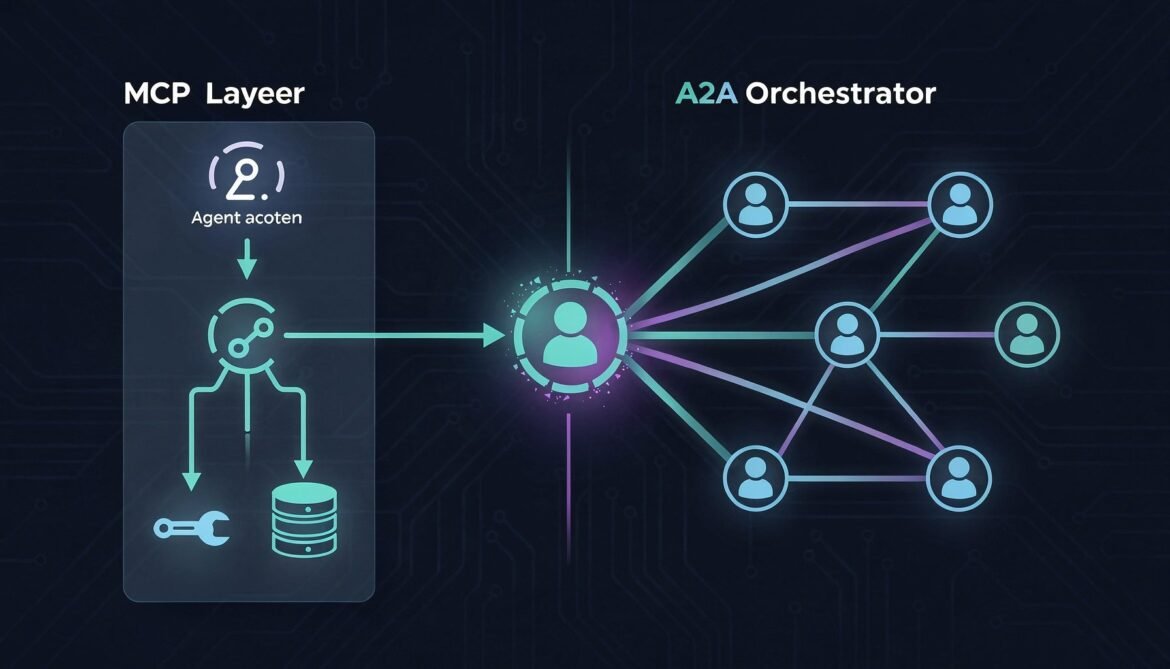
The easiest way to internalize the difference is this: MCP is how an agent talks to its tools. A2A is how an agent talks to other agents.
MCP is vertical. An agent sits above its tools and calls down into them: query a database, read a file, call an API, execute a function. The agent is always the initiator. The tool is always the responder. The relationship is hierarchical.
A2A is horizontal. Agents sit at the same level and delegate tasks to each other. Either side can initiate depending on the workflow. The relationship is collaborative and peer-to-peer.
flowchart TD
subgraph A2A["A2A Layer - Horizontal Agent Coordination"]
OA[Orchestrator Agent]
IA[Inventory Agent]
PA[Procurement Agent]
SA[Supplier Agent]
OA -->|delegate task| IA
OA -->|delegate task| PA
IA -->|delegate task| SA
end
subgraph MCP["MCP Layer - Vertical Tool Access"]
IA -->|query stock| DB1[(Inventory DB)]
IA -->|read thresholds| FS1[Config File Store]
PA -->|create PO| ERP[ERP System]
PA -->|send email| EM[Email Service]
SA -->|fetch catalog| SAPI[Supplier API]
OA -->|search docs| VS[Vector Store]
end
A real enterprise agent uses both protocols. It uses MCP to reach its own tools and data sources. It uses A2A to delegate work to other agents that have their own tools and data sources. Neither protocol knows or cares about the other. They operate on different layers and complement each other cleanly.
How MCP Works at a Glance
MCP was introduced by Anthropic in late 2024 and has become the de facto standard for agent-to-tool connectivity. Over 1,000 community-built MCP servers now exist covering databases, file systems, Slack, GitHub, Google Drive, and hundreds of other services.
An MCP server exposes three primitive types:
Tools - functions the agent can call (e.g. run a SQL query, send an email, create a file)
Resources - data the agent can read (e.g. file contents, database records, API responses)
Prompts - reusable prompt templates the agent can invoke
The agent connects to its MCP servers at startup, discovers available tools via a tools/list call, and then calls tools during task processing via tools/call. The transport is typically stdio for local tools or HTTP with SSE for remote ones.
In Part 3 the Inventory Agent used a hardcoded JavaScript object as its "database." Now we replace that with a real MCP tool connection to a Postgres database. Install the MCP SDK:
npm install @modelcontextprotocol/sdk
Create an MCP client wrapper that connects to your database MCP server and exposes a clean interface for the task handler:
// src/mcpClient.js
import { Client } from "@modelcontextprotocol/sdk/client/index.js";
import { StdioClientTransport } from "@modelcontextprotocol/sdk/client/stdio.js";
import { StreamableHTTPClientTransport } from "@modelcontextprotocol/sdk/client/streamableHttp.js";
export class MCPClient {
constructor() {
this._client = new Client(
{ name: "inventory-agent", version: "1.0.0" },
{ capabilities: { tools: {} } }
);
this._connected = false;
this._tools = new Map();
}
/**
* Connect via stdio (local MCP server process).
* Use this for development or when the MCP server runs as a sidecar.
*/
async connectStdio(command, args = [], env = {}) {
const transport = new StdioClientTransport({
command,
args,
env: { ...process.env, ...env },
});
await this._client.connect(transport);
await this._loadTools();
this._connected = true;
console.log(`[MCP] Connected via stdio: ${command}`);
}
/**
* Connect via HTTP (remote MCP server).
* Use this for production deployments.
*/
async connectHttp(serverUrl, headers = {}) {
const transport = new StreamableHTTPClientTransport(
new URL(serverUrl),
{ requestInit: { headers } }
);
await this._client.connect(transport);
await this._loadTools();
this._connected = true;
console.log(`[MCP] Connected via HTTP: ${serverUrl}`);
}
async _loadTools() {
const { tools } = await this._client.listTools();
for (const tool of tools) {
this._tools.set(tool.name, tool);
}
console.log(`[MCP] Loaded ${tools.length} tool(s): ${tools.map(t => t.name).join(", ")}`);
}
/**
* Call an MCP tool and return the text content of the result.
*/
async callTool(name, args = {}) {
if (!this._connected) throw new Error("MCP client not connected");
if (!this._tools.has(name)) throw new Error(`MCP tool not found: ${name}`);
const result = await this._client.callTool({ name, arguments: args });
if (result.isError) {
throw new Error(`MCP tool error: ${result.content?.[0]?.text || "unknown error"}`);
}
// Parse JSON results automatically
const text = result.content?.[0]?.text || "";
try {
return JSON.parse(text);
} catch {
return text;
}
}
getAvailableTools() {
return [...this._tools.values()];
}
async disconnect() {
await this._client.close();
this._connected = false;
}
}
// Singleton - shared across the agent process
export const mcpClient = new MCPClient();
A Minimal MCP Server for Inventory Data
For this example we build a lightweight MCP server that wraps the inventory data. In production you would use a community MCP server for Postgres, MySQL, or your data warehouse. This shows the pattern without requiring a real database setup:
// mcp-servers/inventory-db/index.js
import { Server } from "@modelcontextprotocol/sdk/server/index.js";
import { StdioServerTransport } from "@modelcontextprotocol/sdk/server/stdio.js";
import {
CallToolRequestSchema,
ListToolsRequestSchema,
} from "@modelcontextprotocol/sdk/types.js";
const INVENTORY = {
"SKU-12345": { quantity: 240, location: "Warehouse-A", reorderThreshold: 50, unitPrice: 12.5 },
"SKU-67890": { quantity: 12, location: "Warehouse-B", reorderThreshold: 30, unitPrice: 42.0 },
"SKU-99999": { quantity: 0, location: "Warehouse-A", reorderThreshold: 20, unitPrice: 8.75 },
};
const server = new Server(
{ name: "inventory-db", version: "1.0.0" },
{ capabilities: { tools: {} } }
);
server.setRequestHandler(ListToolsRequestSchema, async () => ({
tools: [
{
name: "get_stock_levels",
description: "Get current stock levels for one or more SKUs",
inputSchema: {
type: "object",
properties: {
skus: {
type: "array",
items: { type: "string" },
description: "Array of SKU identifiers to query",
},
},
required: ["skus"],
},
},
{
name: "update_stock",
description: "Update the stock quantity for a SKU after a reorder arrives",
inputSchema: {
type: "object",
properties: {
sku: { type: "string" },
newQuantity: { type: "number" },
},
required: ["sku", "newQuantity"],
},
},
{
name: "get_low_stock_items",
description: "Return all SKUs where quantity is at or below the reorder threshold",
inputSchema: { type: "object", properties: {} },
},
],
}));
server.setRequestHandler(CallToolRequestSchema, async (request) => {
const { name, arguments: args } = request.params;
switch (name) {
case "get_stock_levels": {
const result = {};
for (const sku of args.skus) {
result[sku.toUpperCase()] = INVENTORY[sku.toUpperCase()] || { error: "SKU not found" };
}
return { content: [{ type: "text", text: JSON.stringify(result) }] };
}
case "update_stock": {
const sku = args.sku.toUpperCase();
if (!INVENTORY[sku]) return { isError: true, content: [{ type: "text", text: `SKU ${sku} not found` }] };
INVENTORY[sku].quantity = args.newQuantity;
return { content: [{ type: "text", text: JSON.stringify({ updated: true, sku, newQuantity: args.newQuantity }) }] };
}
case "get_low_stock_items": {
const low = Object.entries(INVENTORY)
.filter(([, v]) => v.quantity <= v.reorderThreshold)
.map(([sku, data]) => ({ sku, ...data }));
return { content: [{ type: "text", text: JSON.stringify(low) }] };
}
default:
return { isError: true, content: [{ type: "text", text: `Unknown tool: ${name}` }] };
}
});
const transport = new StdioServerTransport();
await server.connect(transport);
Updating the Task Handler to Use MCP
Replace the hardcoded inventory object in the task handler with real MCP tool calls:
// src/taskHandler.js - updated to use MCP
import { mcpClient } from "./mcpClient.js";
import { updateTaskState, addArtifact, getTask, TaskState } from "./taskStore.js";
export async function processTask(taskId) {
const task = getTask(taskId);
if (!task) return;
const text = extractText(task.messages[0]);
try {
await updateTaskState(taskId, TaskState.WORKING);
if (text.toLowerCase().includes("reorder") || text.toLowerCase().includes("low stock")) {
await handleReorderSkill(taskId, task);
} else {
await handleCheckStockSkill(taskId, text);
}
} catch (err) {
await updateTaskState(taskId, TaskState.FAILED, {
role: "agent",
parts: [{ type: "text", text: `Error: ${err.message}` }],
});
}
}
async function handleCheckStockSkill(taskId, text) {
await updateTaskState(taskId, TaskState.WORKING, {
role: "agent",
parts: [{ type: "text", text: "Parsing SKU identifiers..." }],
});
const skus = text.match(/SKU-\d+/gi)?.map(s => s.toUpperCase()) || [];
if (skus.length === 0) {
await updateTaskState(taskId, TaskState.INPUT_REQUIRED, {
role: "agent",
parts: [{ type: "text", text: "No SKU identifiers found. Please provide SKU IDs." }],
});
return;
}
await updateTaskState(taskId, TaskState.WORKING, {
role: "agent",
parts: [{ type: "text", text: `Querying inventory database via MCP for ${skus.length} SKU(s)...` }],
});
// Real MCP tool call instead of hardcoded data
const stockLevels = await mcpClient.callTool("get_stock_levels", { skus });
const alerts = Object.entries(stockLevels)
.filter(([, v]) => !v.error && v.quantity <= v.reorderThreshold)
.map(([sku, v]) => `${sku}: qty ${v.quantity} (threshold: ${v.reorderThreshold})`);
await addArtifact(taskId, {
name: "stock-levels",
description: "Live stock levels from inventory database",
parts: [{ type: "application/json", data: { stockLevels, alerts } }],
});
await updateTaskState(taskId, TaskState.COMPLETED);
}
async function handleReorderSkill(taskId, task) {
const isConfirmation = task.messages.length > 1;
if (!isConfirmation) {
await updateTaskState(taskId, TaskState.WORKING, {
role: "agent",
parts: [{ type: "text", text: "Fetching low stock items via MCP..." }],
});
// Real MCP tool call
const lowStockItems = await mcpClient.callTool("get_low_stock_items");
if (lowStockItems.length === 0) {
await updateTaskState(taskId, TaskState.COMPLETED, {
role: "agent",
parts: [{ type: "text", text: "All stock levels are healthy. No reorder needed." }],
});
return;
}
const itemList = lowStockItems
.map(i => `- ${i.sku}: qty ${i.quantity} (threshold: ${i.reorderThreshold}, price: $${i.unitPrice})`)
.join("\n");
await updateTaskState(taskId, TaskState.INPUT_REQUIRED, {
role: "agent",
parts: [{ type: "text", text: `Low stock items detected:\n${itemList}\n\nReply with SKU and quantity to reorder.` }],
});
return;
}
// Process confirmation
const confirmText = extractText(task.messages[task.messages.length - 1]);
const skuMatch = confirmText.match(/SKU-\d+/i);
const qtyMatch = confirmText.match(/\d+/g)?.find(n => parseInt(n) > 10);
const sku = skuMatch?.[0].toUpperCase() || lowStockItems?.[0]?.sku;
const quantity = parseInt(qtyMatch || "100");
await updateTaskState(taskId, TaskState.WORKING, {
role: "agent",
parts: [{ type: "text", text: `Processing reorder for ${sku}: ${quantity} units...` }],
});
const po = {
poNumber: `PO-${Date.now()}`,
sku, quantity,
status: "submitted",
estimatedDelivery: new Date(Date.now() + 7 * 86400000).toISOString().split("T")[0],
};
// Update stock level in MCP after PO creation (simulating expected arrival)
// In production, this would be triggered when the PO is actually received
// await mcpClient.callTool("update_stock", { sku, newQuantity: quantity });
await addArtifact(taskId, {
name: "purchase-order",
description: "Generated purchase order",
parts: [{ type: "application/json", data: po }],
});
await updateTaskState(taskId, TaskState.COMPLETED, {
role: "agent",
parts: [{ type: "text", text: `Purchase order ${po.poNumber} submitted for ${sku}.` }],
});
}
function extractText(message) {
return message?.parts?.filter(p => p.type === "text").map(p => p.text).join(" ") || "";
}
Wiring MCP into the Server Startup
Connect the MCP client before starting the HTTP server so tools are available when the first task arrives:
// server.js - updated startup with MCP
import express from "express";
import dotenv from "dotenv";
import wellKnownRouter from "./src/routes/wellKnown.js";
import tasksRouter from "./src/routes/tasks.js";
import { jwtAuth } from "./src/middleware/jwtAuth.js";
import { skillRbac } from "./src/middleware/rbac.js";
import { auditLog } from "./src/middleware/auditLog.js";
import { mcpClient } from "./src/mcpClient.js";
dotenv.config();
async function startServer() {
// Connect to MCP servers before accepting any A2A traffic
console.log("[Startup] Connecting to MCP servers...");
await mcpClient.connectStdio("node", [
"./mcp-servers/inventory-db/index.js"
]);
// In production, you might connect to multiple MCP servers:
// await emailMcpClient.connectHttp(process.env.EMAIL_MCP_URL);
// await erpMcpClient.connectHttp(process.env.ERP_MCP_URL);
console.log("[Startup] MCP connections established");
console.log("[Startup] Available tools:", mcpClient.getAvailableTools().map(t => t.name));
const app = express();
app.use(express.json());
app.use(wellKnownRouter);
app.use("/a2a", auditLog, jwtAuth, skillRbac, tasksRouter);
app.get("/health", (req, res) => res.json({
status: "ok",
mcpTools: mcpClient.getAvailableTools().map(t => t.name)
}));
const PORT = process.env.PORT || 3000;
app.listen(PORT, () => {
console.log(`A2A + MCP Inventory Agent running on port ${PORT}`);
});
// Graceful shutdown
process.on("SIGTERM", async () => {
await mcpClient.disconnect();
process.exit(0);
});
}
startServer().catch(console.error);
The Complete Unified Workflow
Now we can build a workflow that uses both protocols in a single coherent pipeline. The orchestrator coordinates agents via A2A. Each agent independently uses MCP to access its own tools and data sources. Neither layer is aware of the other's existence.
sequenceDiagram
participant OA as Orchestrator Agent
participant IA as Inventory Agent
participant PA as Procurement Agent
participant IMCP as Inventory MCP Server
participant PMCP as ERP MCP Server
Note over OA,PMCP: A2A layer handles agent coordination
Note over IA,IMCP: MCP layer handles tool access
OA->>+IA: A2A: tasks/sendSubscribe\n"Check low stock items"
IA->>+IMCP: MCP: tools/call get_low_stock_items
IMCP-->>-IA: [{sku, quantity, threshold}]
IA-->>OA: SSE: working "Found 2 low stock items"
IA-->>-OA: SSE: completed + artifact
OA->>+PA: A2A: tasks/sendSubscribe\n"Create PO for SKU-67890, 250 units"
PA->>+PMCP: MCP: tools/call create_purchase_order
PMCP-->>-PA: {poNumber, status, estimatedDelivery}
PA->>PMCP: MCP: tools/call send_po_notification
PA-->>-OA: SSE: completed + PO artifact
OA->>OA: Aggregate results\nReturn unified report
Procurement Agent with MCP
Here is how the Procurement Agent looks with MCP wired in. It receives A2A tasks from the orchestrator and uses its own MCP server to interact with the ERP system:
The orchestrator itself can also use MCP for its own tools, such as a vector store for semantic routing or a document retrieval system for context injection:
// orchestrator/workflows/fullSupplyChain.js
import { mcpClient } from "../src/mcpClient.js"; // Orchestrator's own MCP tools
export async function runFullSupplyChainWorkflow(orchestrator) {
console.log("=== Full Supply Chain Workflow (MCP + A2A) ===\n");
// Step 1: Orchestrator uses its own MCP tool to fetch workflow config
// This shows an orchestrator can also use MCP for its own data needs
console.log("[Orchestrator] Fetching workflow configuration via MCP...");
// const config = await mcpClient.callTool("get_workflow_config", { workflow: "supply-chain" });
// Step 2: Delegate inventory check via A2A (Inventory Agent uses MCP internally)
console.log("[Orchestrator] Delegating inventory check via A2A...");
const inventoryResult = await orchestrator.delegate(
"Check low stock items and return items below reorder threshold"
);
const lowStockItems = inventoryResult?.artifacts?.[0]?.parts?.[0]?.data?.stockLevels;
const alerts = inventoryResult?.artifacts?.[0]?.parts?.[0]?.data?.alerts || [];
if (alerts.length === 0) {
console.log("[Orchestrator] All stock levels healthy. Workflow complete.");
return { status: "healthy", alerts: [] };
}
console.log(`[Orchestrator] ${alerts.length} alert(s) detected. Initiating procurement via A2A...`);
// Step 3: For each alert, delegate a PO creation to the Procurement Agent via A2A
// Procurement Agent uses its own MCP tools (ERP, email) internally
const poResults = await Promise.all(
alerts.map(alert => {
// Parse SKU from alert string
const sku = alert.match(/SKU-\d+/i)?.[0] || "SKU-UNKNOWN";
return orchestrator.delegate(`Create PO for ${sku}, 250 units`);
})
);
const purchaseOrders = poResults
.flatMap(r => r?.artifacts || [])
.flatMap(a => a.parts || [])
.filter(p => p.type === "application/json")
.map(p => p.data);
console.log(`\n[Orchestrator] Workflow complete. ${purchaseOrders.length} PO(s) created.`);
purchaseOrders.forEach(po => {
console.log(` - ${po.poNumber}: ${po.sku} x${po.quantity} (${po.status})`);
});
return {
status: "reorders_created",
alerts,
purchaseOrders,
};
}
Protocol Responsibility Summary
After seeing both protocols work together in a real workflow, the division of responsibility becomes very clear:
Question
Protocol
How does the agent read from a database?
MCP
How does the agent call an external API?
MCP
How does the agent send an email?
MCP
How does the agent search a vector store?
MCP
How does one agent delegate a task to another?
A2A
How do agents from different vendors communicate?
A2A
How does an orchestrator route work across a team of agents?
A2A
How do agents discover each other's capabilities?
A2A (Agent Cards)
How does an agent discover its own available tools?
MCP (tools/list)
Choosing MCP Servers for Production
Rather than building every MCP server from scratch, the community has already built production-ready servers for the most common enterprise integrations. For the tools your agents will most commonly need:
The stack is now architecturally complete. You have A2A for agent coordination, MCP for tool access, and the security layer from Part 6 protecting both. What we have not addressed yet is what happens after you deploy this into production: how do you know it is working correctly, how do you debug a failure that spans three agents and five MCP tool calls, and how do you scale to hundreds of concurrent workflows without the in-memory task store becoming a bottleneck?
Part 8 covers all of that: distributed tracing with OpenTelemetry across A2A hops, structured logging that correlates MCP tool calls with the A2A task that triggered them, replacing the in-memory task store with Redis for horizontal scaling, and a production deployment pattern on Azure Container Apps.