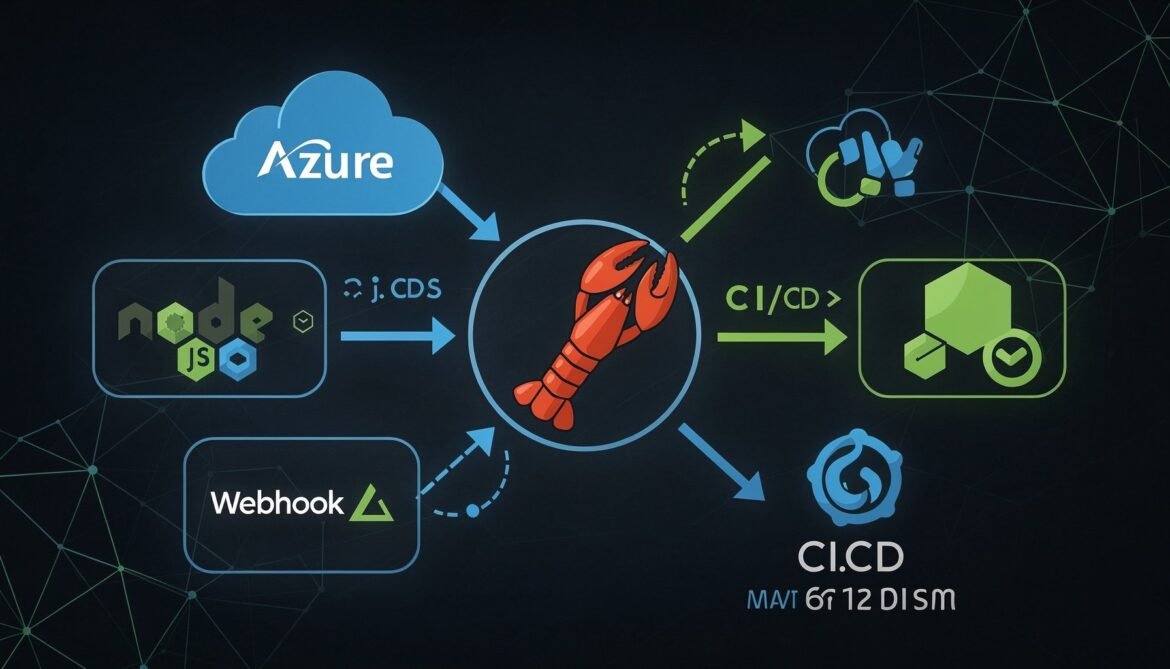
This is Part 8 and the final post in the OpenClaw complete developer series. We have covered everything from installation and skills to security hardening and multi-agent workflows. In this post we bring it all together and focus on the developer experience: integrating OpenClaw directly into your existing Node.js and Azure stack, wiring it into CI/CD pipelines via GitHub Actions, building a reusable SDK wrapper for your team, and packaging your agent configuration so others can deploy it in minutes.
By the end of this post you will have a production-grade integration that makes OpenClaw a genuine part of your development workflow rather than a standalone tool you check separately.
What Full Stack Integration Looks Like
flowchart TD
    subgraph DevStack["Your Development Stack"]
        GH["GitHub\nRepositories + Actions"]
        AZ["Azure\nFunctions + Container Apps"]
        NJ["Node.js\nBackend Services"]
        WP["WordPress\nblog automation"]
    end

    subgraph OpenClaw["OpenClaw Agents"]
        CA["Code Agent\nPR reviews, CI monitor"]
        DA["Deploy Agent\nAzure status, rollbacks"]
        BA["Blog Agent\nContent scheduling"]
        OA["Orchestrator\nCoordinates all"]
    end

    subgraph Channels["Notification Channels"]
        TG["Telegram"]
        SL["Slack"]
    end

    GH -->|"Webhook: push, PR, CI"| CA
    AZ -->|"Webhook: deployment events"| DA
    NJ -->|"SDK calls"| OA
    WP -->|"Post hooks"| BA

    CA & DA & BA -->|"Reports to"| OA
    OA -->|"Alerts and summaries"| TG
    OA -->|"Team updates"| SL
Part 1: The OpenClaw Node.js SDK Wrapper
Rather than making raw HTTP calls to the gateway API throughout your codebase, wrap it in a small SDK class. This gives you a consistent interface, handles authentication, retries on transient failures, and makes it easy to swap agents or ports without touching every call site.
// openclaw-sdk.js
// Reusable SDK for communicating with OpenClaw gateway instances

const http = require("http");
const https = require("https");

class OpenClawAgent {
  /**
   * @param {object} config
   * @param {string} config.host - Gateway host (default: 127.0.0.1)
   * @param {number} config.port - Gateway port
   * @param {string} config.token - Gateway auth token
   * @param {number} [config.timeoutMs] - Request timeout in ms (default: 120000)
   * @param {number} [config.retries] - Number of retries on transient failure (default: 2)
   */
  constructor({ host = "127.0.0.1", port, token, timeoutMs = 120000, retries = 2 }) {
    this.host = host;
    this.port = port;
    this.token = token;
    this.timeoutMs = timeoutMs;
    this.retries = retries;
  }

  /**
   * Send a message to the agent and get a response.
   * @param {string} message - The task or question
   * @param {object} [options]
   * @param {"low"|"medium"|"high"} [options.thinking] - Thinking depth
   * @param {string} [options.sessionId] - Reuse an existing session
   * @returns {Promise<{text: string, sessionId: string}>}
   */
  async send(message, { thinking = "medium", sessionId } = {}) {
    const payload = JSON.stringify({
      message,
      thinking,
      ...(sessionId && { session_id: sessionId }),
    });

    for (let attempt = 0; attempt <= this.retries; attempt++) {
      try {
        const result = await this._request("POST", "/agent", payload);
        return {
          text: result.response || result.text || JSON.stringify(result),
          sessionId: result.session_id,
        };
      } catch (err) {
        const isTransient = err.code === "ECONNRESET" || err.statusCode === 503;
        if (attempt < this.retries && isTransient) {
          await this._sleep(1000 * (attempt + 1));
          continue;
        }
        throw err;
      }
    }
  }

  /**
   * Check gateway health.
   * @returns {Promise}
   */
  async isHealthy() {
    try {
      await this._request("GET", "/health");
      return true;
    } catch {
      return false;
    }
  }

  _request(method, path, body = null) {
    return new Promise((resolve, reject) => {
      const options = {
        hostname: this.host,
        port: this.port,
        path,
        method,
        headers: {
          "Authorization": `Bearer ${this.token}`,
          "Content-Type": "application/json",
          ...(body && { "Content-Length": Buffer.byteLength(body) }),
        },
        timeout: this.timeoutMs,
      };

      const transport = this.host.startsWith("https") ? https : http;
      const req = transport.request(options, (res) => {
        let data = "";
        res.on("data", (chunk) => { data += chunk; });
        res.on("end", () => {
          if (res.statusCode >= 400) {
            const err = new Error(`Gateway returned HTTP ${res.statusCode}: ${data}`);
            err.statusCode = res.statusCode;
            return reject(err);
          }
          try {
            resolve(JSON.parse(data));
          } catch {
            resolve({ text: data });
          }
        });
      });

      req.on("timeout", () => {
        req.destroy();
        reject(new Error(`Request to port ${this.port} timed out after ${this.timeoutMs}ms`));
      });

      req.on("error", reject);
      if (body) req.write(body);
      req.end();
    });
  }

  _sleep(ms) {
    return new Promise((resolve) => setTimeout(resolve, ms));
  }
}

// Pre-configured agent instances
const agents = {
  code: new OpenClawAgent({
    port: 18791,
    token: process.env.CODE_AGENT_TOKEN,
  }),
  research: new OpenClawAgent({
    port: 18792,
    token: process.env.RESEARCH_AGENT_TOKEN,
  }),
  comms: new OpenClawAgent({
    port: 18793,
    token: process.env.COMMS_AGENT_TOKEN,
  }),
};

module.exports = { OpenClawAgent, agents };
Using the SDK in Your Node.js Application
// example-usage.js
const { agents } = require("./openclaw-sdk");

async function runDeploymentChecks(repoName, prNumber) {
  const isUp = await agents.code.isHealthy();
  if (!isUp) {
    console.error("Code agent is not reachable - skipping checks");
    return null;
  }

  const result = await agents.code.send(
    `Run a health check on the PR #${prNumber} in ${repoName}. ` +
    `Check for npm audit issues and summarize the changes. ` +
    `Return findings as a structured JSON object with keys: score, issues, summary.`,
    { thinking: "high" }
  );

  console.log("PR check result:", result.text);
  return result;
}

async function draftReleaseNotes(version, commits) {
  const result = await agents.comms.send(
    `Draft release notes for version ${version}. ` +
    `Here are the commits since last release:\n${commits.join("\n")}\n\n` +
    `Write in a clear, developer-friendly format with sections: ` +
    `New Features, Bug Fixes, Breaking Changes.`
  );
  return result.text;
}

module.exports = { runDeploymentChecks, draftReleaseNotes };
Part 2: GitHub Actions Integration
This GitHub Actions workflow calls your OpenClaw code agent on every pull request to run automated quality checks and post a review comment. It uses a self-hosted runner that has access to your VPS via an SSH tunnel, or you can expose the SDK endpoint via a small Azure Function as shown below.
sequenceDiagram
    participant GH as GitHub PR
    participant GA as GitHub Actions
    participant AF as Azure Function
    participant OC as OpenClaw Code Agent
    participant GPR as GitHub PR Comment

    GH->>GA: PR opened / updated
    GA->>AF: POST /api/pr-review with PR details
    AF->>OC: SDK call to code agent
    OC->>OC: Run health checks, audit, diff analysis
    OC-->>AF: Review result JSON
    AF->>GPR: Post review comment via GitHub API
    AF-->>GA: 200 OK
    GA-->>GH: Workflow complete
# .github/workflows/openclaw-pr-review.yml
name: OpenClaw PR Review

on:
  pull_request:
    types: [opened, synchronize]
    branches: [main, develop]

jobs:
  openclaw-review:
    runs-on: ubuntu-latest
    permissions:
      pull-requests: write
      contents: read

    steps:
      - name: Checkout code
        uses: actions/checkout@v4
        with:
          fetch-depth: 0

      - name: Setup Node.js
        uses: actions/setup-node@v4
        with:
          node-version: "22"

      - name: Run OpenClaw PR Review
        env:
          OPENCLAW_REVIEW_ENDPOINT: ${{ secrets.OPENCLAW_REVIEW_ENDPOINT }}
          OPENCLAW_API_KEY: ${{ secrets.OPENCLAW_API_KEY }}
          GITHUB_TOKEN: ${{ secrets.GITHUB_TOKEN }}
        run: |
          cat << 'EOF' > run-review.js
          const https = require("https");

          const payload = JSON.stringify({
            repository: process.env.GITHUB_REPOSITORY,
            pr_number: process.env.PR_NUMBER,
            head_sha: process.env.HEAD_SHA,
            base_sha: process.env.BASE_SHA,
          });

          const url = new URL(process.env.OPENCLAW_REVIEW_ENDPOINT);
          const options = {
            hostname: url.hostname,
            path: url.pathname,
            method: "POST",
            headers: {
              "Content-Type": "application/json",
              "x-api-key": process.env.OPENCLAW_API_KEY,
              "Content-Length": Buffer.byteLength(payload),
            },
          };

          const req = https.request(options, (res) => {
            let data = "";
            res.on("data", (c) => { data += c; });
            res.on("end", () => {
              console.log("Review triggered:", data);
              process.exit(res.statusCode < 400 ? 0 : 1);
            });
          });

          req.on("error", (e) => { console.error(e); process.exit(1); });
          req.write(payload);
          req.end();
          EOF

          PR_NUMBER=${{ github.event.pull_request.number }} \
          HEAD_SHA=${{ github.event.pull_request.head.sha }} \
          BASE_SHA=${{ github.event.pull_request.base.sha }} \
          node run-review.js
Part 3: Azure Functions as an OpenClaw Bridge
An Azure Function acts as a secure bridge between external services (GitHub Actions, other APIs) and your locally running OpenClaw agents. The function receives authenticated HTTP requests, forwards them to the appropriate agent, and returns the result. This avoids exposing your VPS directly while keeping the agent behind your Cloudflare tunnel for human access.
// azure-function/pr-review/index.js
// Azure Function v4 - HTTP trigger for OpenClaw PR review

const { app } = require("@azure/functions");
const { OpenClawAgent } = require("../shared/openclaw-sdk");

// Agent connects back to your VPS via SSH tunnel or private network
const codeAgent = new OpenClawAgent({
  host: process.env.OPENCLAW_HOST || "127.0.0.1",
  port: parseInt(process.env.OPENCLAW_PORT || "18791"),
  token: process.env.OPENCLAW_CODE_AGENT_TOKEN,
  timeoutMs: 180000,
});

app.http("pr-review", {
  methods: ["POST"],
  authLevel: "function",
  handler: async (request, context) => {
    // Validate API key
    const apiKey = request.headers.get("x-api-key");
    if (apiKey !== process.env.INTERNAL_API_KEY) {
      return { status: 401, body: "Unauthorized" };
    }

    let body;
    try {
      body = await request.json();
    } catch {
      return { status: 400, body: "Invalid JSON body" };
    }

    const { repository, pr_number, head_sha, base_sha } = body;
    if (!repository || !pr_number) {
      return { status: 400, body: "Missing required fields: repository, pr_number" };
    }

    context.log(`PR review triggered: ${repository}#${pr_number} (${head_sha})`);

    const isUp = await codeAgent.isHealthy();
    if (!isUp) {
      context.log("Code agent unreachable");
      return {
        status: 503,
        jsonBody: { error: "Code agent temporarily unavailable" },
      };
    }

    try {
      const result = await codeAgent.send(
        `Perform an automated review for PR #${pr_number} in ${repository}. ` +
        `HEAD SHA: ${head_sha}, BASE SHA: ${base_sha}. ` +
        `Run the node health checker, npm audit, and summarize the git diff. ` +
        `Then post a review comment to the PR using gh CLI. ` +
        `Return a JSON summary with keys: health_score, audit_status, issues_found, comment_posted.`,
        { thinking: "high" }
      );

      context.log(`Review complete for PR #${pr_number}`);
      return {
        status: 200,
        jsonBody: {
          pr_number,
          repository,
          review: result.text,
          session_id: result.sessionId,
        },
      };
    } catch (err) {
      context.log(`Review failed: ${err.message}`);
      return {
        status: 500,
        jsonBody: { error: err.message },
      };
    }
  },
});
Azure Function Configuration
// azure-function/local.settings.json (never commit this file)
{
  "IsEncrypted": false,
  "Values": {
    "AzureWebJobsStorage": "UseDevelopmentStorage=true",
    "FUNCTIONS_WORKER_RUNTIME": "node",
    "OPENCLAW_HOST": "127.0.0.1",
    "OPENCLAW_PORT": "18791",
    "OPENCLAW_CODE_AGENT_TOKEN": "your-code-agent-token",
    "INTERNAL_API_KEY": "your-internal-api-key",
    "GITHUB_TOKEN": "ghp_your-github-token"
  }
}
# Deploy to Azure
az login
az group create --name openclaw-rg --location eastus

az functionapp create \
  --resource-group openclaw-rg \
  --consumption-plan-location eastus \
  --runtime node \
  --runtime-version 22 \
  --functions-version 4 \
  --name openclaw-bridge \
  --storage-account openclawstorage

# Set environment variables in Azure
az functionapp config appsettings set \
  --name openclaw-bridge \
  --resource-group openclaw-rg \
  --settings \
    OPENCLAW_HOST="your-vps-private-ip" \
    OPENCLAW_PORT="18791" \
    OPENCLAW_CODE_AGENT_TOKEN="@Microsoft.KeyVault(SecretUri=...)" \
    INTERNAL_API_KEY="@Microsoft.KeyVault(SecretUri=...)"

# Deploy the function code
func azure functionapp publish openclaw-bridge
Part 4: C# Integration for .NET Backends
For .NET backends, here is a typed OpenClaw client using HttpClient with proper cancellation token support and structured logging.
// OpenClawClient.cs
using System.Net.Http.Headers;
using System.Text;
using System.Text.Json;
using Microsoft.Extensions.Logging;
using Microsoft.Extensions.Options;

namespace YourApp.Infrastructure;

public record OpenClawOptions
{
    public string Host { get; init; } = "127.0.0.1";
    public int Port { get; init; } = 18791;
    public string Token { get; init; } = string.Empty;
    public TimeSpan Timeout { get; init; } = TimeSpan.FromMinutes(2);
}

public record AgentRequest(string Message, string Thinking = "medium");
public record AgentResponse(string Text, string? SessionId);

public class OpenClawClient
{
    private readonly HttpClient _httpClient;
    private readonly ILogger _logger;

    public OpenClawClient(IOptions options, ILogger logger)
    {
        _logger = logger;
        var opts = options.Value;

        _httpClient = new HttpClient
        {
            BaseAddress = new Uri($"http://{opts.Host}:{opts.Port}"),
            Timeout = opts.Timeout,
        };
        _httpClient.DefaultRequestHeaders.Authorization =
            new AuthenticationHeaderValue("Bearer", opts.Token);
    }

    public async Task SendAsync(
        string message,
        string thinking = "medium",
        CancellationToken cancellationToken = default)
    {
        var payload = JsonSerializer.Serialize(new AgentRequest(message, thinking));
        var content = new StringContent(payload, Encoding.UTF8, "application/json");

        _logger.LogInformation("Sending task to OpenClaw agent: {Message}", message[..Math.Min(100, message.Length)]);

        var response = await _httpClient.PostAsync("/agent", content, cancellationToken);
        response.EnsureSuccessStatusCode();

        var json = await response.Content.ReadAsStringAsync(cancellationToken);
        using var doc = JsonDocument.Parse(json);
        var root = doc.RootElement;

        var text = root.TryGetProperty("response", out var resp)
            ? resp.GetString() ?? string.Empty
            : root.TryGetProperty("text", out var txt)
                ? txt.GetString() ?? string.Empty
                : json;

        var sessionId = root.TryGetProperty("session_id", out var sid)
            ? sid.GetString()
            : null;

        _logger.LogInformation("Agent response received ({Length} chars)", text.Length);
        return new AgentResponse(text, sessionId);
    }

    public async Task IsHealthyAsync(CancellationToken cancellationToken = default)
    {
        try
        {
            var response = await _httpClient.GetAsync("/health", cancellationToken);
            return response.IsSuccessStatusCode;
        }
        catch
        {
            return false;
        }
    }
}
// Program.cs - Register the client
builder.Services.Configure(
    builder.Configuration.GetSection("OpenClaw"));
builder.Services.AddSingleton();

// Usage in a controller or service
public class DeploymentService
{
    private readonly OpenClawClient _agent;

    public DeploymentService(OpenClawClient agent)
    {
        _agent = agent;
    }

    public async Task GetDeploymentSummaryAsync(string resourceGroup)
    {
        if (!await _agent.IsHealthyAsync())
            return "Agent unavailable";

        var result = await _agent.SendAsync(
            $"Check Azure deployment status for resource group {resourceGroup} " +
            $"and return a brief summary of the last 5 deployments.",
            thinking: "medium"
        );

        return result.Text;
    }
}
Part 5: Packaging Your Agent Configuration for Teams
Once you have a working multi-agent setup, the natural next step is sharing it with your team. The goal is a configuration package that lets a new team member deploy the full agent stack in under 15 minutes.
flowchart TD
    subgraph Package["openclaw-team-config (git repo)"]
        R["README.md\nSetup instructions"]
        S["setup.sh\nAutomated installation script"]
        T["templates/\nopenclaw.json templates per agent"]
        SK["skills/\nCustom team skills"]
        SO["soul-templates/\nSOUL.md templates"]
        CR["cron/\nStandard cron job definitions"]
        ENV["env.example\nAll required env vars listed"]
        GH[".github/workflows/\nCI integration workflows"]
    end

    Package -->|"git clone"| Dev["New team member"]
    Dev -->|"cp env.example .env"| Fill["Fill in API keys"]
    Fill -->|"bash setup.sh"| Deploy["Agents running in 15 min"]
The Setup Script
#!/usr/bin/env bash
# setup.sh - Deploy the full team OpenClaw stack
# Usage: bash setup.sh
# Requires: Node.js 22+, .env file filled in from env.example

set -euo pipefail

AGENTS=("code-agent" "research-agent" "comms-agent" "orchestrator")
BASE_PORTS=(18791 18792 18793 18794)
SCRIPT_DIR="$(cd "$(dirname "${BASH_SOURCE[0]}")" && pwd)"

# Load environment
if [ ! -f "$SCRIPT_DIR/.env" ]; then
  echo "Error: .env file not found. Copy env.example to .env and fill in your values."
  exit 1
fi
source "$SCRIPT_DIR/.env"

echo "Installing OpenClaw..."
npm install -g openclaw@latest

echo "Creating agent workspaces..."
for i in "${!AGENTS[@]}"; do
  AGENT="${AGENTS[$i]}"
  PORT="${BASE_PORTS[$i]}"
  WORKSPACE="$HOME/agents/$AGENT"

  mkdir -p "$WORKSPACE/skills"
  mkdir -p "$WORKSPACE/cron"

  # Copy template configs
  sed \
    -e "s/__PORT__/$PORT/g" \
    -e "s/__AGENT__/$AGENT/g" \
    "$SCRIPT_DIR/templates/openclaw.json.template" \
    > "$WORKSPACE/openclaw.json"

  # Copy SOUL.md template
  cp "$SCRIPT_DIR/soul-templates/$AGENT.md" "$WORKSPACE/SOUL.md" 2>/dev/null || \
    cp "$SCRIPT_DIR/soul-templates/default.md" "$WORKSPACE/SOUL.md"

  # Copy shared skills
  cp -r "$SCRIPT_DIR/skills/." "$WORKSPACE/skills/"

  # Copy cron jobs
  cp -r "$SCRIPT_DIR/cron/$AGENT/." "$WORKSPACE/cron/" 2>/dev/null || true

  echo "Workspace ready: $WORKSPACE (port $PORT)"
done

echo "Creating systemd services..."
for i in "${!AGENTS[@]}"; do
  AGENT="${AGENTS[$i]}"
  PORT="${BASE_PORTS[$i]}"
  NODE_BIN="$(which node)"
  OPENCLAW_BIN="$(which openclaw)"

  cat > "$HOME/.config/systemd/user/openclaw-$AGENT.service" << EOF
[Unit]
Description=OpenClaw $AGENT
After=network-online.target

[Service]
Type=simple
WorkingDirectory=$HOME/agents/$AGENT
ExecStart=$OPENCLAW_BIN gateway start --workspace $HOME/agents/$AGENT --port $PORT --foreground
Restart=always
RestartSec=10
EnvironmentFile=$SCRIPT_DIR/.env
Environment=PATH=$(dirname $NODE_BIN):/usr/local/bin:/usr/bin:/bin
Environment=HOME=$HOME
MemoryMax=256M

[Install]
WantedBy=default.target
EOF

done

loginctl enable-linger "$(whoami)"
systemctl --user daemon-reload

for AGENT in "${AGENTS[@]}"; do
  systemctl --user enable "openclaw-$AGENT"
  systemctl --user start "openclaw-$AGENT"
  echo "Started openclaw-$AGENT"
done

echo ""
echo "Setup complete. Checking agent health..."
sleep 5

for i in "${!AGENTS[@]}"; do
  AGENT="${AGENTS[$i]}"
  PORT="${BASE_PORTS[$i]}"
  STATUS=$(systemctl --user is-active "openclaw-$AGENT" 2>/dev/null)
  echo "  openclaw-$AGENT (port $PORT): $STATUS"
done

echo ""
echo "Run 'openclaw doctor' to verify your configuration."
echo "Message your Telegram bots to test each agent."
The env.example File
# env.example - Copy to .env and fill in all values
# Never commit .env to version control

# LLM Provider (choose one)
ANTHROPIC_API_KEY=sk-ant-your-key-here
# OPENAI_API_KEY=sk-your-key-here
# DEEPSEEK_API_KEY=your-key-here

# Telegram Bot Tokens (create one bot per agent via @BotFather)
CODE_AGENT_BOT_TOKEN=123456789:your-code-agent-bot-token
RESEARCH_AGENT_BOT_TOKEN=123456789:your-research-agent-bot-token
COMMS_AGENT_BOT_TOKEN=123456789:your-comms-agent-bot-token
ORCHESTRATOR_BOT_TOKEN=123456789:your-orchestrator-bot-token

# Gateway Auth Tokens (generate with: node -e "console.log(require('crypto').randomBytes(32).toString('hex'))")
CODE_AGENT_TOKEN=generate-a-random-32-byte-hex-string
RESEARCH_AGENT_TOKEN=generate-a-random-32-byte-hex-string
COMMS_AGENT_TOKEN=generate-a-random-32-byte-hex-string
ORCHESTRATOR_TOKEN=generate-a-random-32-byte-hex-string

# GitHub Integration
GITHUB_TOKEN=ghp_your-github-personal-access-token

# Azure Integration
AZURE_SUBSCRIPTION_ID=your-subscription-id

# Notifications
TELEGRAM_ALERT_CHAT_ID=your-personal-chat-id-for-alerts
Part 6: Python Utility for Agent-Driven Reports
Here is a complete Python script that uses your multi-agent setup to generate a weekly project report and email it via the comms agent. This is the kind of task that showcases what OpenClaw is actually good at: pulling together information from multiple sources and producing a formatted output without manual work.
#!/usr/bin/env python3
# weekly-report.py
# Generates a weekly project report using OpenClaw agents
# Schedule with: 0 17 * * 5 python3 /home/openclaw/weekly-report.py

import asyncio
import httpx
import os
from datetime import datetime, timezone

AGENTS = {
    "code": {"port": 18791, "token": os.environ["CODE_AGENT_TOKEN"]},
    "research": {"port": 18792, "token": os.environ["RESEARCH_AGENT_TOKEN"]},
    "comms": {"port": 18793, "token": os.environ["COMMS_AGENT_TOKEN"]},
}

async def ask_agent(name: str, message: str, thinking: str = "medium") -> str:
    """Send a task to a specific OpenClaw agent."""
    agent = AGENTS[name]
    url = f"http://127.0.0.1:{agent['port']}/agent"
    headers = {
        "Authorization": f"Bearer {agent['token']}",
        "Content-Type": "application/json",
    }

    async with httpx.AsyncClient(timeout=180.0) as client:
        try:
            resp = await client.post(
                url,
                json={"message": message, "thinking": thinking},
                headers=headers,
            )
            resp.raise_for_status()
            data = resp.json()
            return data.get("response") or data.get("text") or str(data)
        except Exception as e:
            return f"[Error from {name} agent: {e}]"


async def generate_weekly_report():
    week = datetime.now(timezone.utc).strftime("%Y-W%V")
    today = datetime.now(timezone.utc).strftime("%B %d, %Y")
    print(f"Generating weekly report for {week}...")

    # Run code and research tasks in parallel
    code_task = ask_agent(
        "code",
        "Summarize this week's development activity: "
        "(1) Number of PRs opened and merged, "
        "(2) Any failed CI runs and their status, "
        "(3) Azure deployments made this week with their outcomes, "
        "(4) Any security vulnerabilities found in npm audit. "
        "Be concise, one paragraph per section.",
        thinking="high",
    )

    research_task = ask_agent(
        "research",
        "Find the 3 most important tech news items from this week relevant to: "
        "Node.js, Azure, AI agents, and open source developer tools. "
        "Summarize each in 2 sentences. Include the source URL.",
    )

    code_summary, research_summary = await asyncio.gather(code_task, research_task)
    print("Code and research summaries ready.")

    # Use comms agent to draft and send the report
    report_prompt = f"""
Draft and send a weekly report email with the following information.

Subject: Weekly Project Report - {today}

DEVELOPMENT ACTIVITY THIS WEEK:
{code_summary}

TECH NEWS WORTH NOTING:
{research_summary}

Format as a clean HTML email with clear headings for each section.
Keep the tone professional but readable.
Add a footer: "Generated by OpenClaw - {today}"

After drafting, send it to the configured weekly report recipient.
Confirm when sent.
"""

    send_result = await ask_agent("comms", report_prompt, thinking="medium")
    print(f"Comms agent result: {send_result[:200]}...")
    print(f"Weekly report for {week} complete.")


if __name__ == "__main__":
    asyncio.run(generate_weekly_report())
The Complete Series: What You Have Built
Across these eight posts you have gone from understanding what OpenClaw is to running a production-grade multi-agent system integrated into your development stack. Here is what the complete system looks like:
mindmap
  root((Your OpenClaw System))
    Infrastructure
      Linux VPS Ubuntu 24.04
      systemd user services
      Cloudflare tunnel
      Cloudflare Access auth
      Log rotation
      Health check cron
    Agents
      Code Agent port 18791
        github skill
        node-health skill
        azure-status skill
        cron-backup skill
      Research Agent port 18792
        web-search skill
        arxiv-digest skill
        news-monitor skill
      Comms Agent port 18793
        gog Google Workspace
        slack skill
        morning-briefing skill
      Orchestrator port 18794
        Coordinates all agents
    Security
      Gateway bound to loopback
      exec allowedCommands list
      blockedPatterns protection
      Credentials in env file
      Prompt injection SOUL.md guardrails
      Weekly skill audits
    Integrations
      GitHub Actions workflow
      Azure Functions bridge
      Node.js SDK wrapper
      C# HttpClient integration
      Python async orchestrator
      Weekly report automation
    Automation
      Morning briefing 7AM weekdays
      GitHub CI monitor every 30 min
      PR auto-review on open
      Weekly report Fridays 5PM
      Backup check Mondays 9AM
Where to Go From Here
The series is complete but OpenClaw itself continues to evolve rapidly. The project is now under an independent open-source foundation with OpenAI sponsoring development, which means new features, better tooling, and a growing skill ecosystem. Here are the most valuable next steps depending on what you want to do:
- Build more custom skills: every workflow you repeat manually is a candidate. Start with your most tedious weekly task and write a skill for it.
- Explore the ClawHub registry: with 13,000+ skills there are almost certainly integrations you have not thought of. Browse by category and audit before installing.
- Contribute back: if you build a useful skill, submit it to the official skills repository. The community grows stronger with quality contributions.
- Follow security advisories: subscribe to the OpenClaw GitHub repository notifications. New CVEs and patches move quickly given the project’s scale.
- Experiment with local models: as Ollama models improve, running a capable local LLM for routine agent tasks becomes increasingly practical and keeps sensitive data entirely on your own infrastructure.
Final Thoughts on OpenClaw
OpenClaw represents something genuinely new in how developers interact with AI. Not as a chat assistant you ask questions, but as an agent runtime you configure once and that quietly handles work in the background. The lobster mascot is a bit silly but the technology underneath is serious and moving fast.
The most important thing to internalize from this entire series is the security posture. Broad system access with an open skill ecosystem is a real risk surface. The developers who will get the most out of OpenClaw long term are the ones who treat it like any other piece of infrastructure: locked down by default, extended deliberately, and reviewed regularly.
If you have followed along and built your own setup, the architecture you now have, a hardened multi-agent system integrated with your stack and running automated workflows 24/7, would have taken weeks to build from scratch a year ago. That pace of change is what makes this space worth paying close attention to.
The Complete Series
- Part 1: What Is OpenClaw and Why Developers Should Care
- Part 2: Installation and First Setup
- Part 3: Understanding Tools and Skills
- Part 4: Building Your First Custom Skill
- Part 5: Deploying OpenClaw on a VPS
- Part 6: Security Hardening and Best Practices
- Part 7: Multi-Agent Workflows and Automation
- Part 8: Integrating OpenClaw with Your Development Stack (this post)
References
- OpenClaw GitHub Repository – github.com/openclaw/openclaw
- OpenClaw Documentation – docs.openclaw.ai
- OpenClaw Official Website – openclaw.ai
- Microsoft Learn – Azure Functions Overview
- Microsoft Learn – Azure Functions HTTP Triggers
- GitHub Actions Documentation – docs.github.com
- Valletta Software – OpenClaw Architecture Guide 2026
- Towards AI – OpenClaw Complete Tutorial 2026
- VoltAgent – Awesome OpenClaw Skills Registry